


What You'll Learn Today
Master the ambassador pattern, understand how to manage external service connections, and discover why this pattern is crucial for service discovery, load balancing, and network resilience in distributed systems.
The Problem: External Service Complexity
Your application needs to connect to external databases, APIs, and services. But these connections involve complex networking, authentication, load balancing, and service discovery. Your application shouldn't know about database cluster topology, API endpoint failover, or connection pooling strategies.
The ambassador pattern solves this by providing a local proxy that handles all external communication complexity, presenting a simple interface to your application.
What Are Ambassador Containers?
Ambassador containers are proxy containers that handle external service communication on behalf of your main application. They act as local representatives (ambassadors) for remote services, managing connections, load balancing, and service discovery while your application simply connects to localhost.
Key Characteristics:
Proxy functionality: Route and manage external connections
Service discovery: Find and connect to appropriate service instances
Load balancing: Distribute traffic across multiple endpoints
Connection management: Handle pooling, retries, and failover
Security: Manage authentication and encryption
Simplicity: Present localhost interface to applications
How Ambassador Containers Work
The Proxy Architecture:
Application Container    →    Ambassador Container    →    External Services
(localhost:5432)             (Proxy Logic)               (Database Cluster)
                                                        (API Endpoints)
                                                        (Message Queues)
Architecture Pattern:
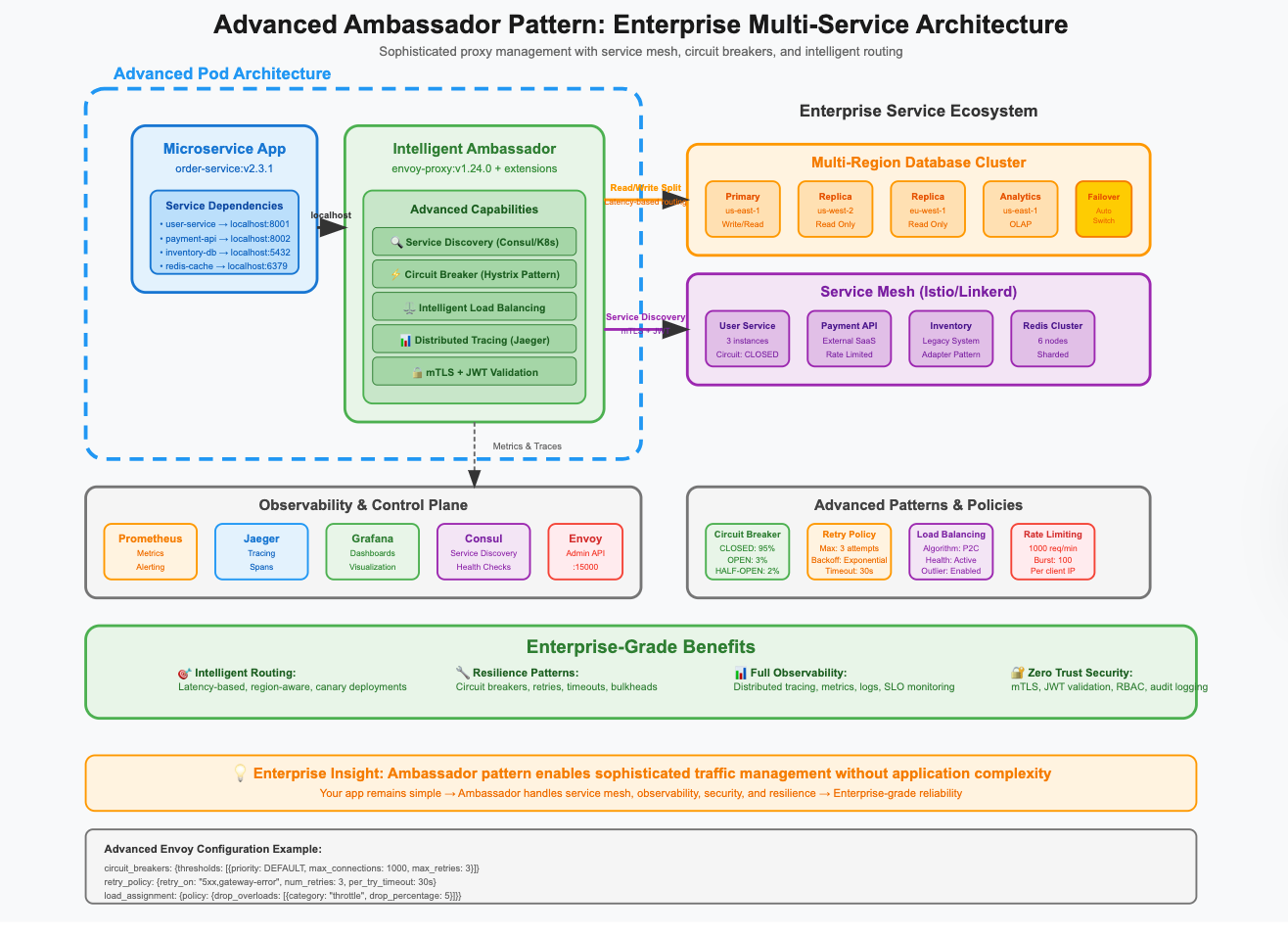
Common Ambassador Patterns
1. Database Ambassador
Purpose: Manage database connections and connection pooling Common Use: PostgreSQL clusters, MySQL replication, Redis sharding
containers:
- name: web-app
  image: my-web-app:latest
  env:
  - name: DATABASE_URL
    value: "postgresql://user:pass@localhost:5432/mydb"
  # App connects to localhost, ambassador handles the rest

- name: postgres-ambassador
  image: pgbouncer:latest
  ports:
  - containerPort: 5432
  env:
  - name: DATABASES_HOST
    value: "postgres-cluster.database.svc.cluster.local"
  - name: DATABASES_PORT
    value: "5432"
  - name: POOL_MODE
    value: "transaction"
  - name: MAX_CLIENT_CONN
    value: "100"
  - name: DEFAULT_POOL_SIZE
    value: "25"
  volumeMounts:
  - name: pgbouncer-config
    mountPath: /etc/pgbouncer
2. API Gateway Ambassador
Purpose: Manage external API connections and service discovery Common Use: Microservices communication, third-party API integration
containers:
- name: frontend-app
  image: my-frontend:latest
  env:
  - name: API_ENDPOINT
    value: "http://localhost:8080/api"
  # App uses simple localhost endpoint

- name: api-ambassador
  image: envoy:v1.20.0
  ports:
  - containerPort: 8080
  - containerPort: 9901  # Admin interface
  volumeMounts:
  - name: envoy-config
    mountPath: /etc/envoy
  command:
  - /usr/local/bin/envoy
  - -c
  - /etc/envoy/envoy.yaml
  - --service-cluster
  - api-ambassador
3. Message Queue Ambassador
Purpose: Handle message queue connections and failover Common Use: RabbitMQ clusters, Kafka brokers, Redis pub/sub
containers:
- name: worker-app
  image: my-worker:latest
  env:
  - name: RABBITMQ_URL
    value: "amqp://guest:guest@localhost:5672/"
  # Simple connection string

- name: rabbitmq-ambassador
  image: rabbitmq-proxy:latest
  ports:
  - containerPort: 5672
  env:
  - name: RABBITMQ_CLUSTER_NODES
    value: "rabbit-1.messaging.svc.cluster.local:5672,rabbit-2.messaging.svc.cluster.local:5672,rabbit-3.messaging.svc.cluster.local:5672"
  - name: LOAD_BALANCE_ALGORITHM
    value: "round_robin"
  - name: HEALTH_CHECK_INTERVAL
    value: "30s"
4. Cache Ambassador
Purpose: Manage distributed cache connections and sharding Common Use: Redis clusters, Memcached pools, distributed caching
containers:
- name: api-server
  image: my-api:latest
  env:
  - name: REDIS_URL
    value: "redis://localhost:6379"
  # App sees single Redis instance

- name: redis-ambassador
  image: redis-cluster-proxy:latest
  ports:
  - containerPort: 6379
  env:
  - name: REDIS_CLUSTER_NODES
    value: "redis-1.cache.svc.cluster.local:6379,redis-2.cache.svc.cluster.local:6379,redis-3.cache.svc.cluster.local:6379"
  - name: CLUSTER_MODE
    value: "enabled"
  - name: CONSISTENT_HASHING
    value: "true"
5. Service Mesh Ambassador
Purpose: Handle service-to-service communication and observability Common Use: Istio, Linkerd, Consul Connect integration
containers:
- name: user-service
  image: user-service:v2.1
  ports:
  - containerPort: 8080
  env:
  - name: ORDERS_SERVICE_URL
    value: "http://localhost:8081"
  # Service mesh handles routing

- name: service-mesh-ambassador
  image: istio/proxyv2:1.11.0
  ports:
  - containerPort: 15001  # Outbound
  - containerPort: 15006  # Inbound
  - containerPort: 15090  # Stats
  env:
  - name: PILOT_CERT_PROVIDER
    value: "istiod"
  - name: CA_ADDR
    value: "istiod.istio-system.svc:15012"
  volumeMounts:
  - name: istio-certs
    mountPath: /etc/ssl/certs
Real-World Use Cases
Use Case 1: Multi-Region Database Failover
Scenario: Application needs to connect to primary database with automatic failover to read replicas
apiVersion: v1
kind: Pod
metadata:
  name: app-with-db-failover
spec:
  containers:
  - name: web-application
    image: my-web-app:v3.2
    env:
    - name: DATABASE_URL
      value: "postgresql://app:secret@localhost:5432/production"
    # App uses simple connection string

  - name: postgres-ambassador
    image: pgpool:latest
    ports:
    - containerPort: 5432
    env:
    - name: PGPOOL_BACKENDS
      value: "0:postgres-primary.db.svc.cluster.local:5432:1:/var/lib/postgresql/data:ALLOW_TO_FAILOVER,1:postgres-replica-1.db.svc.cluster.local:5432:1:/var/lib/postgresql/data:ALLOW_TO_FAILOVER,2:postgres-replica-2.db.svc.cluster.local:5432:1:/var/lib/postgresql/data:ALLOW_TO_FAILOVER"
    - name: PGPOOL_SR_CHECK_PERIOD
      value: "10"
    - name: PGPOOL_HEALTH_CHECK_PERIOD
      value: "30"
    - name: PGPOOL_FAILOVER_COMMAND
      value: "/usr/local/bin/failover.sh %d %h %p %D %m %H %M %P %r %R"
    volumeMounts:
    - name: pgpool-config
      mountPath: /usr/local/etc

  volumes:
  - name: pgpool-config
    configMap:
      name: pgpool-configuration
Use Case 2: External API Integration with Circuit Breaker
Scenario: Application needs to call external APIs with resilience patterns
apiVersion: v1
kind: Pod
metadata:
  name: resilient-api-client
spec:
  containers:
  - name: business-app
    image: my-business-app:latest
    env:
    - name: PAYMENT_API_URL
      value: "http://localhost:8080/payments"
    - name: NOTIFICATION_API_URL
      value: "http://localhost:8081/notifications"
    # App uses localhost endpoints

  - name: api-ambassador
    image: envoy:v1.20.0
    ports:
    - containerPort: 8080  # Payment API proxy
    - containerPort: 8081  # Notification API proxy
    - containerPort: 9901  # Admin interface
    volumeMounts:
    - name: envoy-config
      mountPath: /etc/envoy
    command:
    - /usr/local/bin/envoy
    - -c
    - /etc/envoy/envoy.yaml

  volumes:
  - name: envoy-config
    configMap:
      name: envoy-ambassador-config

---
apiVersion: v1
kind: ConfigMap
metadata:
  name: envoy-ambassador-config
data:
  envoy.yaml: |
    admin:
      address:
        socket_address:
          address: 0.0.0.0
          port_value: 9901
    static_resources:
      listeners:
      - name: payment_api_listener
        address:
          socket_address:
            address: 0.0.0.0
            port_value: 8080
        filter_chains:
        - filters:
          - name: envoy.filters.network.http_connection_manager
            typed_config:
              "@type": type.googleapis.com/envoy.extensions.filters.network.http_connection_manager.v3.HttpConnectionManager
              stat_prefix: payment_api
              route_config:
                name: local_route
                virtual_hosts:
                - name: payment_service
                  domains: ["*"]
                  routes:
                  - match:
                      prefix: "/"
                    route:
                      cluster: payment_api_cluster
                      retry_policy:
                        retry_on: "5xx"
                        num_retries: 3
              http_filters:
              - name: envoy.filters.http.router
      clusters:
      - name: payment_api_cluster
        connect_timeout: 30s
        type: LOGICAL_DNS
        lb_policy: ROUND_ROBIN
        circuit_breakers:
          thresholds:
          - priority: DEFAULT
            max_connections: 100
            max_requests: 200
            max_retries: 3
        load_assignment:
          cluster_name: payment_api_cluster
          endpoints:
          - lb_endpoints:
            - endpoint:
                address:
                  socket_address:
                    address: payment-api.external.com
                    port_value: 443
            - endpoint:
                address:
                  socket_address:
                    address: payment-api-backup.external.com
                    port_value: 443
Use Case 3: Service Discovery with Consul
Scenario: Application needs to discover and connect to services registered in Consul
apiVersion: v1
kind: Pod
metadata:
  name: service-discovery-app
spec:
  containers:
  - name: microservice
    image: my-microservice:latest
    env:
    - name: USER_SERVICE_URL
      value: "http://localhost:8080"
    - name: ORDER_SERVICE_URL
      value: "http://localhost:8081"
    # App uses localhost, ambassador handles discovery

  - name: consul-ambassador
    image: consul-template:latest
    ports:
    - containerPort: 8080
    - containerPort: 8081
    env:
    - name: CONSUL_ADDR
      value: "consul.service.consul:8500"
    command:
    - consul-template
    - -template="/templates/nginx.conf.tpl:/etc/nginx/nginx.conf:nginx -s reload"
    - -template="/templates/services.json.tpl:/etc/services/services.json"
    volumeMounts:
    - name: consul-templates
      mountPath: /templates
    - name: nginx-config
      mountPath: /etc/nginx

  - name: nginx-proxy
    image: nginx:alpine
    ports:
    - containerPort: 80
    volumeMounts:
    - name: nginx-config
      mountPath: /etc/nginx

  volumes:
  - name: consul-templates
    configMap:
      name: consul-service-templates
  - name: nginx-config
    emptyDir: {}
Advanced Ambassador Patterns
Multi-Protocol Ambassador
containers:
- name: multi-protocol-app
  image: my-app:latest

- name: protocol-ambassador
  image: multi-protocol-proxy:latest
  ports:
  - containerPort: 5432   # PostgreSQL
  - containerPort: 6379   # Redis
  - containerPort: 5672   # RabbitMQ
  - containerPort: 9092   # Kafka
  env:
  - name: POSTGRES_BACKENDS
    value: "postgres-1.db.svc.cluster.local:5432,postgres-2.db.svc.cluster.local:5432"
  - name: REDIS_BACKENDS
    value: "redis-1.cache.svc.cluster.local:6379,redis-2.cache.svc.cluster.local:6379"
  - name: RABBITMQ_BACKENDS
    value: "rabbit-1.mq.svc.cluster.local:5672,rabbit-2.mq.svc.cluster.local:5672"
Intelligent Routing Ambassador
containers:
- name: application
  image: my-app:latest

- name: intelligent-ambassador
  image: intelligent-proxy:latest
  env:
  - name: ROUTING_STRATEGY
    value: "latency_based"
  - name: HEALTH_CHECK_INTERVAL
    value: "10s"
  - name: CIRCUIT_BREAKER_ENABLED
    value: "true"
  - name: LOAD_BALANCING_ALGORITHM
    value: "least_connections"
  - name: REGION_PREFERENCE
    value: "us-west-2,us-east-1"
Best Practices for Ambassador Containers
1. Health Checks and Monitoring
containers:
- name: monitored-ambassador
  image: pgbouncer:latest
  livenessProbe:
    tcpSocket:
      port: 5432
    initialDelaySeconds: 30
    periodSeconds: 10
  readinessProbe:
    tcpSocket:
      port: 5432
    initialDelaySeconds: 5
    periodSeconds: 5
  ports:
  - containerPort: 5432
  - containerPort: 9127  # Metrics endpoint
2. Configuration Management
containers:
- name: configurable-ambassador
  image: envoy:latest
  volumeMounts:
  - name: ambassador-config
    mountPath: /etc/ambassador
  - name: tls-certs
    mountPath: /etc/ssl/certs
  env:
  - name: CONFIG_RELOAD_INTERVAL
    value: "30s"
  - name: LOG_LEVEL
    value: "info"
3. Security Configuration
containers:
- name: secure-ambassador
  image: secure-proxy:latest
  env:
  - name: TLS_ENABLED
    value: "true"
  - name: CLIENT_CERT_REQUIRED
    value: "true"
  - name: CIPHER_SUITES
    value: "ECDHE-RSA-AES256-GCM-SHA384,ECDHE-RSA-AES128-GCM-SHA256"
  volumeMounts:
  - name: tls-certificates
    mountPath: /etc/ssl/certs
    readOnly: true
  - name: ca-certificates
    mountPath: /etc/ssl/ca
    readOnly: true
4. Resource Management
containers:
- name: resource-managed-ambassador
  image: connection-pool-proxy:latest
  resources:
    requests:
      memory: "256Mi"
      cpu: "200m"
    limits:
      memory: "512Mi"
      cpu: "500m"
  env:
  - name: MAX_CONNECTIONS
    value: "1000"
  - name: CONNECTION_TIMEOUT
    value: "30s"
  - name: IDLE_TIMEOUT
    value: "300s"
Monitoring Ambassador Containers
Key Metrics to Track:
Connection count: Active connections through ambassador
Request latency: Time for requests to complete
Error rates: Failed connections and timeouts
Backend health: Status of upstream services
Resource usage: CPU/Memory consumption of proxy
Monitoring Setup:
containers:
- name: ambassador-with-metrics
  image: envoy:latest
  ports:
  - containerPort: 8080  # Application traffic
  - containerPort: 9901  # Admin/metrics
  env:
  - name: STATS_CONFIG_ENABLED
    value: "true"
  - name: STATS_SINKS
    value: "prometheus"

- name: prometheus-exporter
  image: prom/statsd-exporter:latest
  ports:
  - containerPort: 9102
  command:
  - /bin/statsd_exporter
  - --statsd.mapping-config=/etc/statsd/statsd.yaml
  - --web.listen-address=:9102
Common Pitfalls and Solutions
Pitfall 1: Single Point of Failure
Problem: Ambassador becomes bottleneck or fails Solution: Implement high availability and health checks
containers:
- name: ha-ambassador
  image: ha-proxy:latest
  livenessProbe:
    httpGet:
      path: /health
      port: 8080
    failureThreshold: 3
  readinessProbe:
    httpGet:
      path: /ready
      port: 8080
    failureThreshold: 1
Pitfall 2: Configuration Drift
Problem: Ambassador configuration becomes outdated Solution: Implement configuration management and updates
containers:
- name: self-updating-ambassador
  image: config-managed-proxy:latest
  env:
  - name: CONFIG_SOURCE
    value: "consul"
  - name: CONFIG_UPDATE_INTERVAL
    value: "60s"
  - name: GRACEFUL_RELOAD
    value: "true"
Pitfall 3: Security Vulnerabilities
Problem: Ambassador exposes internal services Solution: Implement proper authentication and authorization
containers:
- name: secure-ambassador
  image: authenticated-proxy:latest
  env:
  - name: AUTH_ENABLED
    value: "true"
  - name: JWT_SECRET
    valueFrom:
      secretKeyRef:
        name: jwt-secret
        key: secret
Ambassador vs Other Patterns
Ambassador vs Sidecar:
Ambassador: Focuses on external service communication
Sidecar: Adds general functionality (logging, monitoring)
Ambassador vs Adapter:
Ambassador: Proxies and manages connections
Adapter: Transforms data formats and protocols
Ambassador vs Service:
Ambassador: Runs in same pod as application
Service: Runs as separate deployment with load balancing
Troubleshooting Guide
Connection Issues:
# Check ambassador connectivity
kubectl exec <pod-name> -c <ambassador-container> -- netstat -tlnp

# Test backend connections
kubectl exec <pod-name> -c <ambassador-container> -- curl -v backend-service:8080

# Check ambassador logs
kubectl logs <pod-name> -c <ambassador-container> --tail=100
Performance Issues:
# Monitor connection pool
kubectl exec <pod-name> -c <ambassador-container> -- curl localhost:9901/stats

# Check resource usage
kubectl top pods --containers

# Analyze traffic patterns
kubectl exec <pod-name> -c <ambassador-container> -- ss -tuln
Configuration Problems:
# Validate configuration
kubectl exec <pod-name> -c <ambassador-container> -- envoy --mode validate --config-path /etc/envoy/envoy.yaml

# Check service discovery
kubectl exec <pod-name> -c <ambassador-container> -- dig service-name.namespace.svc.cluster.local
Action Items for This Week
Identify External Dependencies: Map out all external services your applications connect to
Assess Connection Complexity: Document current connection management challenges
Implement Ambassador POC: Start with database connection pooling ambassador
Add Monitoring: Implement ambassador-specific metrics and alerting
Plan Migration: Design strategy for moving complex connections to ambassador pattern
Key Takeaways
Ambassador containers handle external service communication complexity
They provide localhost interfaces while managing remote connections
Essential for service discovery, load balancing, and resilience
Focus on health checks, monitoring, and configuration management
Simplify application code by abstracting connection details
Enable better testing and development environments
Next Week Preview
Next week, we'll explore Multi-Container Pod Orchestration – how to combine all these patterns (pause, init, sidecar, adapter, ambassador) into cohesive, production-ready architectures.
Questions about ambassador patterns or specific proxy implementations? Reply to this newsletter or reach out to me on LinkedIn or X
Happy ambassadoring!