
GPU Node Pools: Taints, Tolerations, and Cost Isolation
Without taints, a basic nginx pod can schedule on your $30K H100 node. Here is how to prevent that.

You have a cluster with 3 types of nodes. CPU nodes for web applications. A100 nodes for inference. T4 nodes for development and testing.
Without any configuration, the Kubernetes scheduler treats them all the same. It sees available CPU and memory. It does not distinguish between a $200/month CPU node and a $30K/year GPU node.
A basic nginx pod with 100m CPU and 128Mi memory can land on your H100 node. The scheduler found resources. It scheduled the pod. It did exactly what it was designed to do.
This article covers how to stop that from happening. And how to build a multi-tier GPU cluster where the right workloads land on the right hardware every time.
The Problem: GPUs as Shared Resources
By default, any pod can schedule on any node that has enough CPU and memory. GPU nodes have CPU and memory in addition to GPUs. Non-GPU workloads see the CPU and memory and schedule there.
The result: GPU nodes run a mix of GPU workloads and random CPU workloads. The CPU workloads consume memory and CPU that GPU workloads need. And you are paying GPU pricing for pods that do not use GPUs.
# Check what is running on your GPU nodes
kubectl get pods --all-namespaces -o wide --field-selector spec.nodeName=gpu-node-1
If you see system pods, monitoring agents, log collectors, and random application pods alongside your vLLM deployment, your GPU nodes are not isolated.
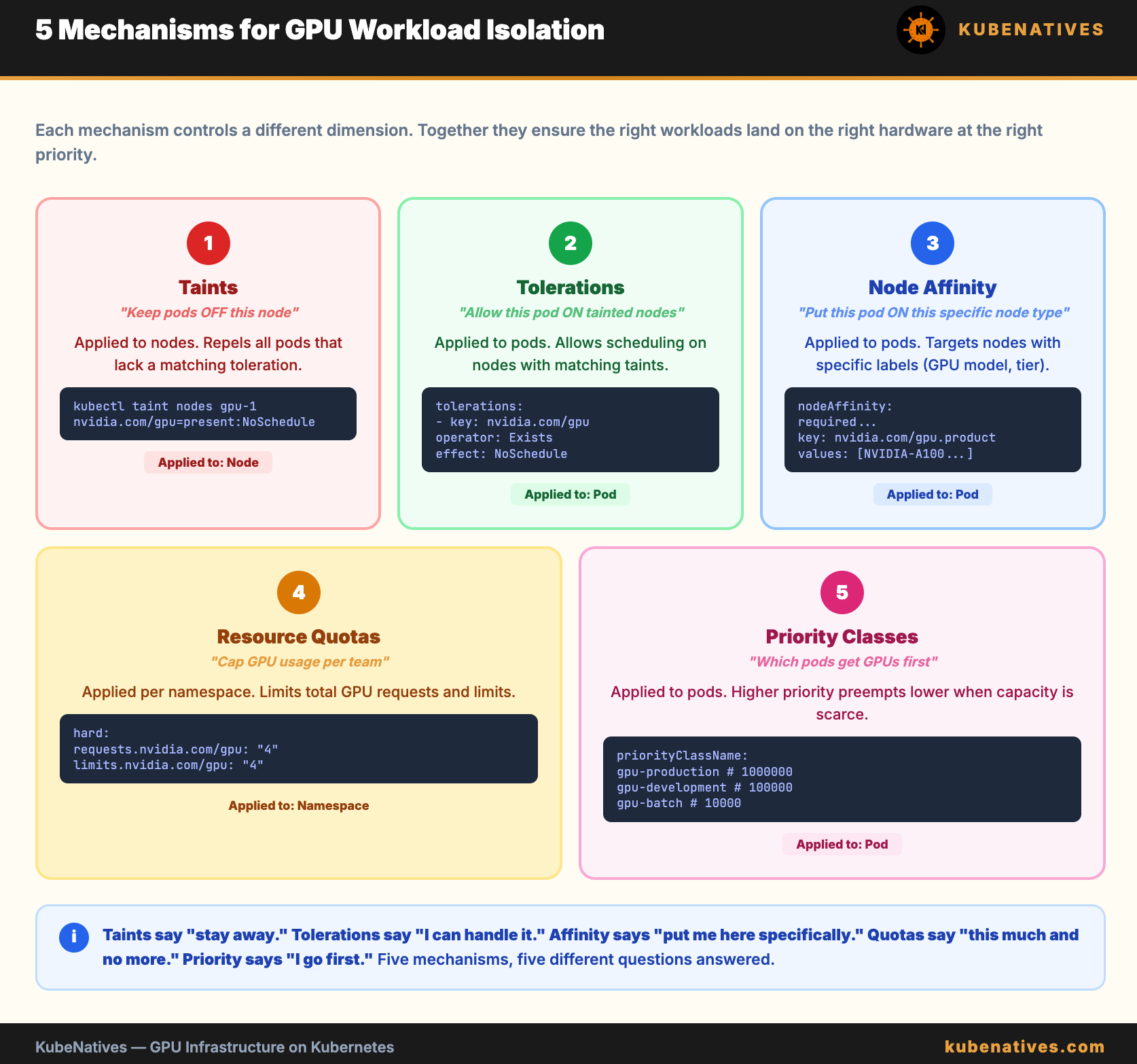
Taints: Keep Non-GPU Workloads Off GPU Nodes
A taint on a node tells the scheduler: “Do not place pods here unless they explicitly tolerate this taint.”
# Add a taint to all GPU nodes
kubectl taint nodes gpu-node-1 nvidia.com/gpu=present:NoSchedule
kubectl taint nodes gpu-node-2 nvidia.com/gpu=present:NoSchedule
After this, no pod can schedule on these nodes unless it has a matching toleration.
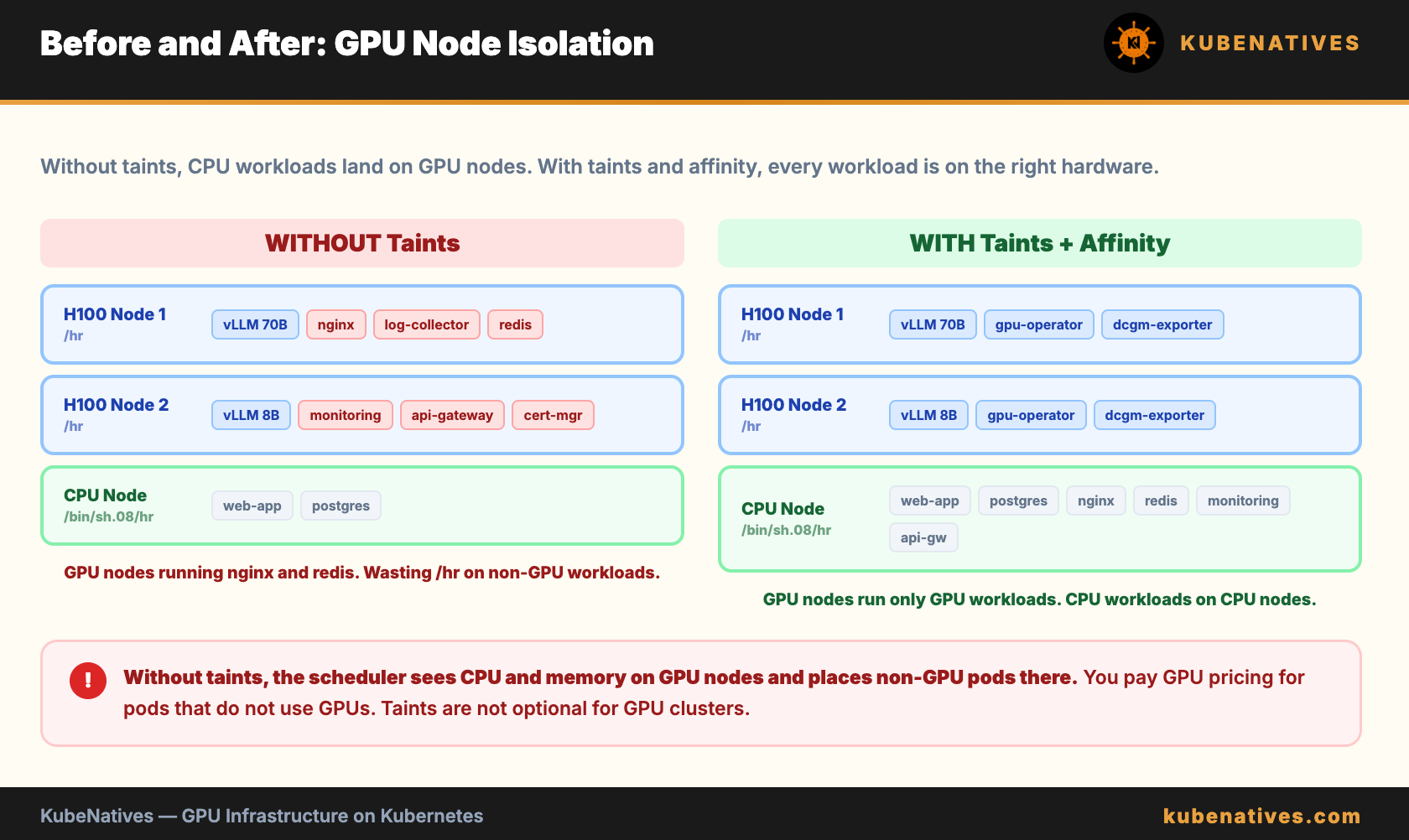
On managed Kubernetes (EKS, GKE, AKS), you set taints at the node pool level. Every node in the pool gets the taint automatically:
# GKE example: GPU node pool with taint
gcloud container node-pools create gpu-pool \
  --cluster=my-cluster \
  --machine-type=a2-highgpu-1g \
  --accelerator=type=nvidia-tesla-a100,count=1 \
  --num-nodes=3 \
  --node-taints=nvidia.com/gpu=present:NoSchedule
Important: The NVIDIA GPU Operator automatically adds the taint nvidia.com/gpu=present:NoSchedule when it detects GPU hardware. If you are using the GPU Operator, the taints are already there. Check with:
kubectl get nodes -l nvidia.com/gpu.present=true \
  -o jsonpath='{range .items[*]}{.metadata.name}{"\t"}{.spec.taints}{"\n"}{end}'
Tolerations: Allow GPU Workloads to Schedule
Your GPU pods need a toleration that matches the taint:
spec:
  tolerations:
  - key: nvidia.com/gpu
    operator: Exists
    effect: NoSchedule
  containers:
  - name: vllm
    resources:
      limits:
        nvidia.com/gpu: "1"
The operator: Exists means “tolerate this taint regardless of value.” This is simpler than matching a specific value and works for any GPU taint.
What about system pods? DaemonSets like the GPU Operator, node exporter, and log collectors need to run on GPU nodes too. They should also have the toleration. The GPU Operator DaemonSets already include it. Your monitoring stack may need it added manually.
Node Affinity: Target Specific GPU Types
Taints prevent the wrong pods from landing on GPU nodes. But in a mixed GPU cluster (A100s and T4s), you also need to ensure the right pods land on the right GPU type.
GPU Feature Discovery (part of the GPU Operator) labels each node with its GPU model:
nvidia.com/gpu.product=NVIDIA-A100-SXM4-80GB
nvidia.com/gpu.product=NVIDIA-T4
nvidia.com/gpu.product=NVIDIA-H100-80GB-HBM3
Use node affinity to target specific GPU types:
spec:
  affinity:
    nodeAffinity:
      requiredDuringSchedulingIgnoredDuringExecution:
        nodeSelectorTerms:
        - matchExpressions:
          - key: nvidia.com/gpu.product
            operator: In
            values:
            - NVIDIA-A100-SXM4-80GB
  tolerations:
  - key: nvidia.com/gpu
    operator: Exists
    effect: NoSchedule
  containers:
  - name: vllm
    resources:
      limits:
        nvidia.com/gpu: "1"
This pod will only schedule on A100 nodes. Even if T4 nodes have available GPUs.
The Multi-Tier GPU Cluster Pattern
Here is the pattern I use for production clusters with mixed GPU types:
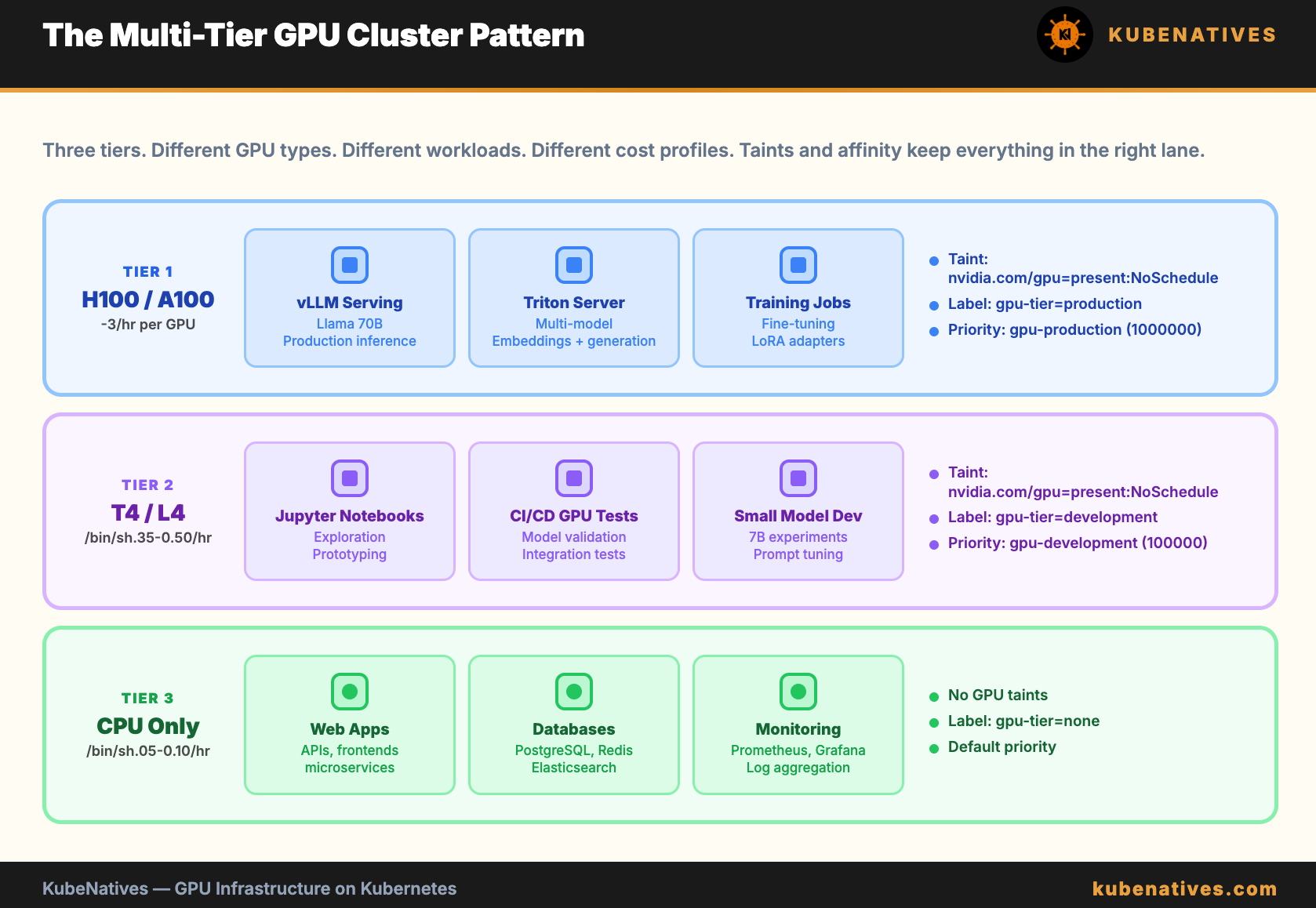
Each tier has its own taint and label. Workloads use tolerations to enter the GPU tiers and node affinity to target the right tier.
# Production inference: must land on Tier 1
affinity:
  nodeAffinity:
    requiredDuringSchedulingIgnoredDuringExecution:
      nodeSelectorTerms:
      - matchExpressions:
        - key: gpu-tier
          operator: In
          values:
          - production
# Dev notebook: must land on Tier 2
affinity:
  nodeAffinity:
    requiredDuringSchedulingIgnoredDuringExecution:
      nodeSelectorTerms:
      - matchExpressions:
        - key: gpu-tier
          operator: In
          values:
          - development
Cost Isolation with Resource Quotas
Taints control where pods run. Resource quotas control how much each team can consume.
apiVersion: v1
kind: ResourceQuota
metadata:
  name: gpu-quota
  namespace: ml-team-a
spec:
  hard:
    requests.nvidia.com/gpu: "4"
    limits.nvidia.com/gpu: "4"
---
apiVersion: v1
kind: ResourceQuota
metadata:
  name: gpu-quota
  namespace: ml-team-b
spec:
  hard:
    requests.nvidia.com/gpu: "2"
    limits.nvidia.com/gpu: "2"
Team A can use up to 4 GPUs. Team B can use up to 2. Neither team can consume more than their quota regardless of what is available in the cluster.
Combine resource quotas with LimitRanges to prevent individual pods from requesting too many GPUs:
apiVersion: v1
kind: LimitRange
metadata:
  name: gpu-limits
  namespace: ml-team-a
spec:
  limits:
  - type: Container
    max:
      nvidia.com/gpu: "2"
    default:
      nvidia.com/gpu: "1"
No single container in team A’s namespace can request more than 2 GPUs. Default is 1 if not specified.
Priority Classes for GPU Workloads
When GPU capacity is scarce, priority classes determine which pods get GPUs first and which get preempted.
apiVersion: scheduling.k8s.io/v1
kind: PriorityClass
metadata:
  name: gpu-production
value: 1000000
globalDefault: false
description: "Production GPU inference workloads"
---
apiVersion: scheduling.k8s.io/v1
kind: PriorityClass
metadata:
  name: gpu-development
value: 100000
globalDefault: false
description: "Development GPU workloads"
---
apiVersion: scheduling.k8s.io/v1
kind: PriorityClass
metadata:
  name: gpu-batch
value: 10000
globalDefault: false
preemptionPolicy: Never
description: "Batch GPU jobs - do not preempt others"
Production inference gets the highest priority. If a production pod needs a GPU and all are allocated, Kubernetes preempts a development or batch pod to make room.
The preemptionPolicy: Never on the batch class means batch jobs will wait for GPUs but will never kick out other workloads.
# Use in pod spec
spec:
  priorityClassName: gpu-production
Common Mistakes
Mistake 1: No taints on GPU nodes. Random CPU workloads consume resources on expensive GPU hardware. Always taint GPU nodes.
Mistake 2: Forgetting tolerations on GPU Operator DaemonSets. If you add custom taints, the GPU Operator pods need matching tolerations. Otherwise the operator cannot run on GPU nodes, which means GPUs are never registered.
Mistake 3: Using nodeSelector instead of nodeAffinity. nodeSelector is simpler but less flexible. You cannot express “schedule on A100 OR H100” with nodeSelector. nodeAffinity supports multiple values and complex expressions.
Mistake 4: No resource quotas. Without quotas, one team can consume all GPUs in the cluster. This is fine with 2 engineers. It is chaos with 10 teams.
Mistake 5: Same priority for all GPU workloads. When capacity is tight, production inference and a Jupyter notebook have the same priority. The notebook should yield to production. Use priority classes.
The Bottom Line
GPU nodes are expensive. Treat them like expensive resources.
Taints keep non-GPU workloads off GPU hardware. Tolerations allow GPU workloads in. Node affinity targets specific GPU types. Resource quotas cap per-team consumption. Priority classes ensure production wins when capacity is scarce.
Five mechanisms. Together they turn a cluster where anything runs anywhere into a multi-tier platform where the right workloads land on the right hardware at the right priority.
Next week: Network Policies in Practice: When Your Pods Cannot Talk to Each Other.
If you are building GPU infrastructure on Kubernetes, I cover scheduling, model serving, and production operations every week. Subscribe at kubenatives.com.