
Kubernetes DNS Troubleshooting: CoreDNS, ndots, and the 5-Second Timeout
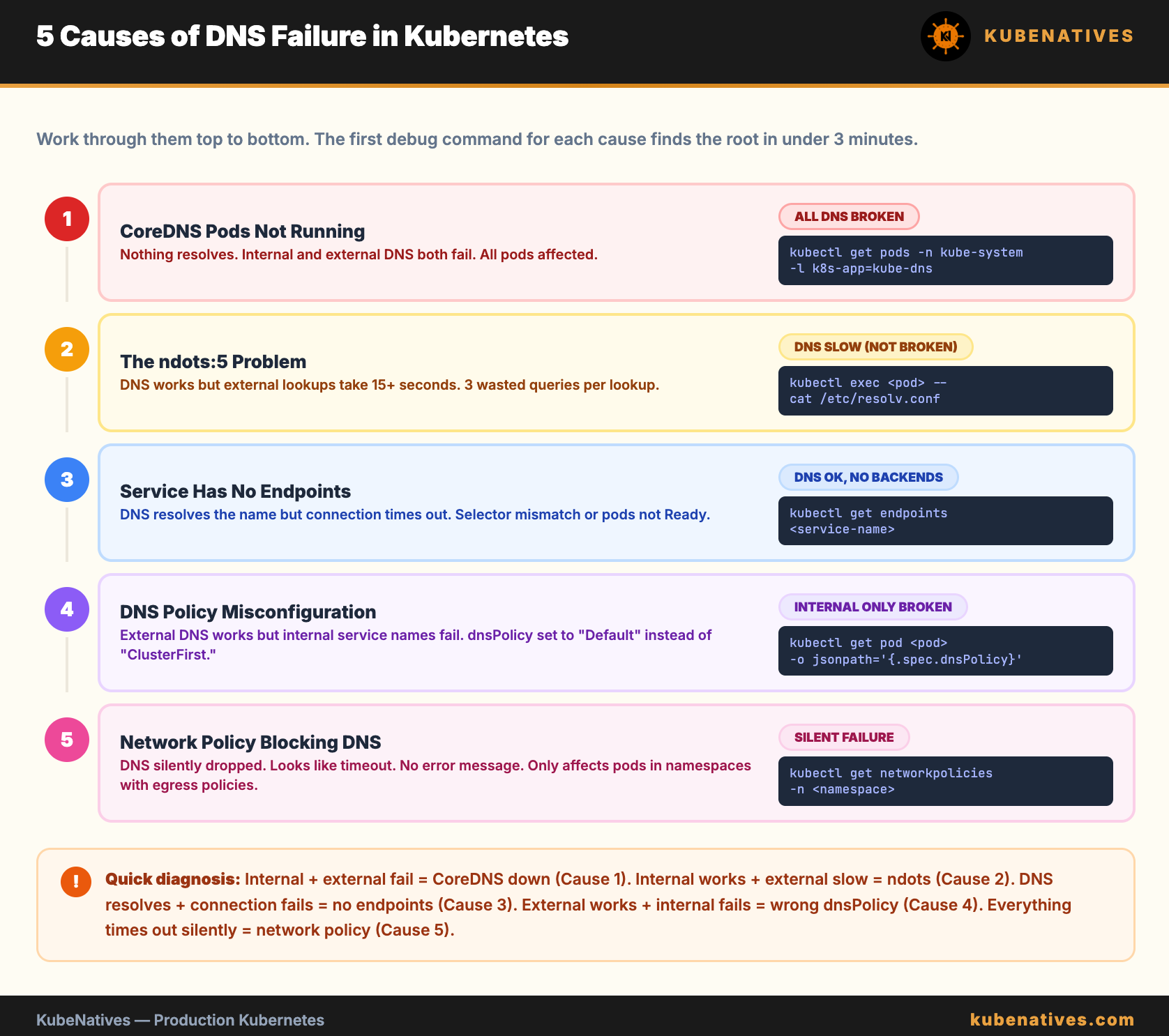
Every DNS issue in Kubernetes traces back to one of 5 causes. Here is how to find which one in under 3 minutes.

Your pod cannot reach the database. The application logs say “connection timed out.” You check the Service. It exists. The Endpoints look correct. The pod is running.
You spend an hour checking network policies, firewall rules, and pod security settings. Then someone runs nslookup from inside the pod, and DNS does not resolve.
It was DNS. It is always DNS.
But “it is DNS” is not a diagnosis. There are exactly 5 causes of DNS failures in Kubernetes. This article covers all of them with the exact commands to identify each one.
How Kubernetes DNS Works
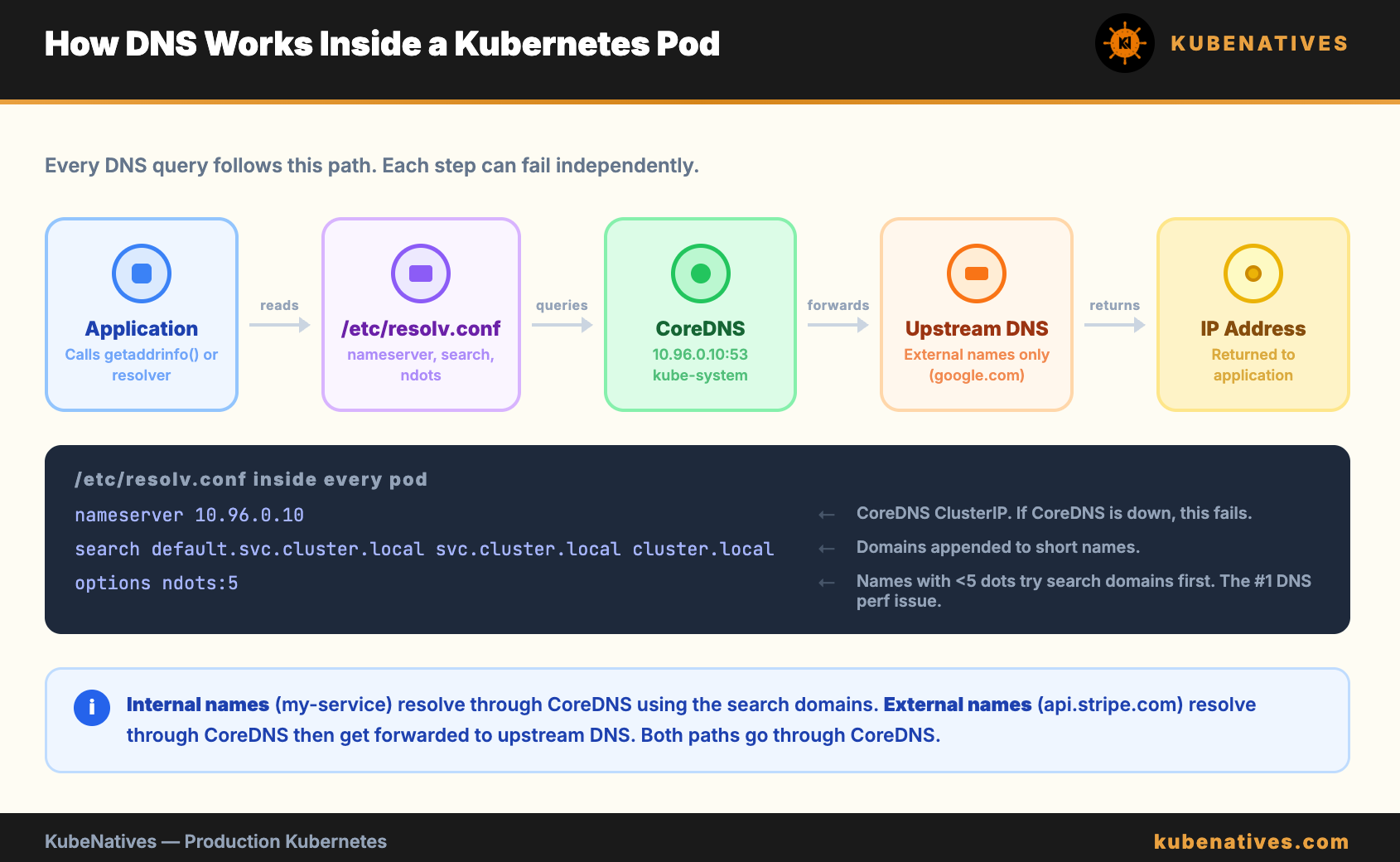
Before debugging, you need to understand the path a DNS query takes inside a cluster.
When a pod makes a DNS request, here is what happens:
The application calls getaddrinfo() or a similar resolver function. The resolver reads /etc/resolv.conf inside the container. That file points to the CoreDNS Service IP (typically 10.96.0.10). The query goes to CoreDNS. CoreDNS looks up the answer and returns it.
The /etc/resolv.conf inside every pod looks like this:
nameserver 10.96.0.10
search default.svc.cluster.local svc.cluster.local cluster.local
options ndots:5
Three lines. Each one matters. Each one can break.
nameserver is the CoreDNS ClusterIP. If CoreDNS is down, no DNS works.
search is the list of domains Kubernetes appends to short names. When you call my-service, Kubernetes actually tries my-service.default.svc.cluster.local first, then my-service.svc.cluster.local, then my-service.cluster.local, then the bare name.
ndots:5 is the setting that causes the most confusion and the most wasted time in production. More on this below.
Cause 1: CoreDNS Pods Are Not Running
The simplest cause. If CoreDNS is down, nothing resolves.
# Check CoreDNS pods
kubectl get pods -n kube-system -l k8s-app=kube-dns
Every pod should be Running. If any pod is in CrashLoopBackOff, Pending, or Error, that is your DNS problem.
Common reasons CoreDNS pods fail:
CoreDNS ConfigMap has a syntax error. Someone edited the Corefile and introduced a typo. CoreDNS cannot start with an invalid configuration.
# Check the Corefile
kubectl get configmap coredns -n kube-system -o yaml
Resource limits are too low. On large clusters, CoreDNS needs more CPU and memory than the defaults. If it is OOMKilled, DNS fails intermittently under load.
# Check for OOMKilled events
kubectl describe pods -n kube-system -l k8s-app=kube-dns | grep -A5 "Last State"
The node running CoreDNS is unhealthy. CoreDNS runs as a Deployment (usually 2 replicas). If both land on the same node and that node has issues, DNS fails cluster-wide.
The fix: Ensure CoreDNS replicas are spread across nodes with pod anti-affinity. Most managed K8s providers do this by default. Self-managed clusters often miss it.
Cause 2: The ndots Problem
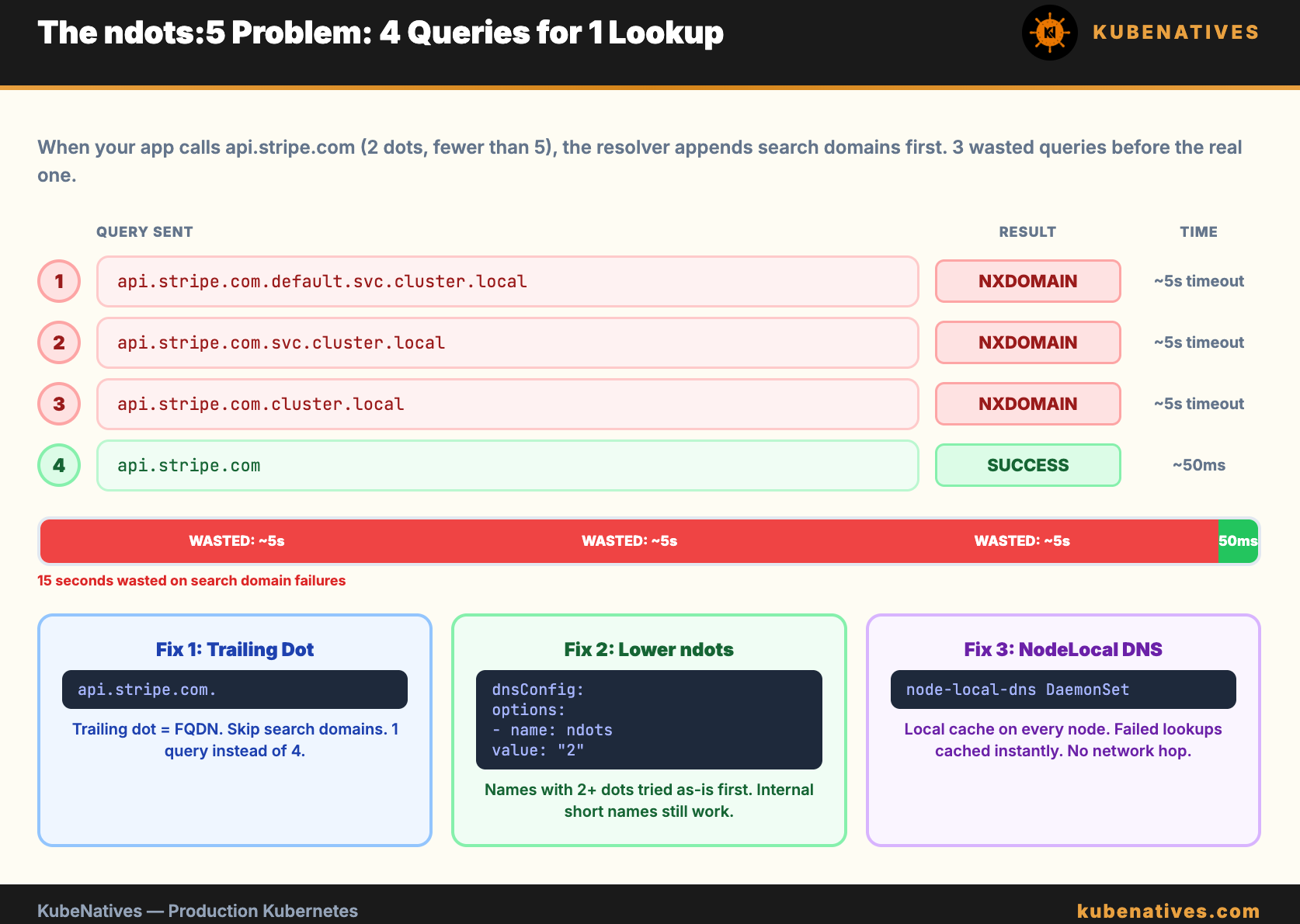
This is the most common DNS performance issue in Kubernetes. It does not cause DNS to fail. It causes DNS to be slow.
The ndots:5 setting in /etc/resolv.conf tells the resolver: “If the name has fewer than 5 dots, append the search domains before trying the name as-is.”
When your application calls api.stripe.com, the resolver counts the dots. Two dots. Fewer than 5. So it tries:
1. api.stripe.com.default.svc.cluster.local  → NXDOMAIN
2. api.stripe.com.svc.cluster.local          → NXDOMAIN
3. api.stripe.com.cluster.local              → NXDOMAIN
4. api.stripe.com                            → SUCCESS
Four DNS queries for one lookup. The first three always fail. Each failure takes time. On a busy cluster with thousands of pods, this multiplies into millions of unnecessary DNS queries per hour.
The 5-second timeout. Each failed query has a timeout. With the default timeout of 5 seconds and multiple search domains, a single external DNS lookup can take 15 to 20 seconds in the worst case. This is the “5-second timeout” that shows up in application latency and makes engineers think the network is slow.
The fix:
Option 1: Use fully qualified domain names (FQDNs) with a trailing dot. api.stripe.com. (note the dot at the end) tells the resolver “this is a complete name, do not append search domains.” The resolver sends one query instead of four.
Option 2: Lower ndots in your pod spec for pods that make many external DNS calls:
spec:
  dnsConfig:
    options:
    - name: ndots
      value: "2"
With ndots:2, names with 2 or more dots (like api.stripe.com) are tried as-is first. Internal service names (like my-service) still get the search domain treatment because they have 0 dots.
Option 3: Use a node-level DNS cache (NodeLocal DNSCache). This caches responses locally on each node, eliminating the network hop to CoreDNS for repeated queries. It also handles negative caching, so the failed search domain lookups resolve instantly from cache.
# Check if NodeLocal DNSCache is running
kubectl get pods -n kube-system -l k8s-app=node-local-dns
Cause 3: Service Has No Endpoints
DNS resolves the Service name correctly. But the Service has no healthy backends. The connection still fails.
This looks like a DNS problem because curl my-service:8080 times out. But DNS is working fine. The Service just has nothing to route to.
# Check if the Service has endpoints
kubectl get endpoints my-service

# Expected: at least one IP:port listed
# If empty: no pods match the Service selector
If the endpoints list is empty:
The Service selector does not match any pod labels. This is the most common cause. A typo in the selector or the pod labels.
# Compare Service selector with pod labels
kubectl get svc my-service -o jsonpath='{.spec.selector}'
kubectl get pods -l app=my-service
The pods exist but are not Ready. If the readiness probe is failing, Kubernetes removes the pod from the endpoints list. The pod is running but not receiving traffic.
# Check pod readiness
kubectl get pods -l app=my-service -o wide
# Look for 0/1 in the READY column
Cause 4: DNS Policy Misconfiguration
Every pod has a dnsPolicy setting. The default is ClusterFirst, which means “use CoreDNS for everything.” But if someone sets it to the wrong value, DNS breaks.
The four DNS policies:
ClusterFirst (default): Uses CoreDNS. Internal names resolve to cluster services. External names get forwarded to upstream DNS. This is what you want 99% of the time.
Default: Uses the node’s DNS configuration, not CoreDNS. Internal service names do not resolve. This is almost never what you want in a cluster.
None: No DNS configuration at all. You must provide everything in dnsConfig. Used for very specific edge cases.
ClusterFirstWithHostNet: For pods running with hostNetwork: true. Uses CoreDNS but falls back to the node’s DNS if CoreDNS does not respond.
The most common mistake: setting dnsPolicy: Default, thinking it means “use the default Kubernetes DNS.” It does not. It means “use the node’s DNS, skip CoreDNS entirely.” Internal service names stop resolving.
# Check a pod's DNS policy
kubectl get pod my-pod -o jsonpath='{.spec.dnsPolicy}'
If a pod can resolve external names (google.com) but not internal names (my-service.default.svc.cluster.local), check the DNS policy first. It is probably set to Default instead of ClusterFirst.
Cause 5: Network Policy Blocking DNS
If you have NetworkPolicies in your cluster, they might block DNS traffic. CoreDNS runs on port 53 (UDP and TCP). If your network policy does not explicitly allow egress to port 53, DNS queries are silently dropped.
# Check for network policies in the pod's namespace
kubectl get networkpolicies -n <namespace>
If network policies exist, verify they allow DNS egress:
# NetworkPolicy that allows DNS
apiVersion: networking.k8s.io/v1
kind: NetworkPolicy
metadata:
  name: allow-dns
spec:
  podSelector: {}
  policyTypes:
  - Egress
  egress:
  - to:
    - namespaceSelector: {}
    ports:
    - protocol: UDP
      port: 53
    - protocol: TCP
      port: 53
The tricky part: DNS failures from network policies are silent. The query is dropped. The application waits for a timeout. There is no error message saying “blocked by policy.” It just looks like DNS is slow or unresponsive.
How to test: Exec into the pod and run a manual DNS query:
kubectl exec -it my-pod -- nslookup kubernetes.default
If this times out but CoreDNS pods are healthy, a network policy is likely blocking the traffic.
The 3-Minute Debug Script
Run this script when DNS is broken. It checks all 5 causes in order.
#!/bin/bash
echo "=============================="
echo "Kubernetes DNS Debug"
echo "=============================="

echo ""
echo "=== 1. CoreDNS Pod Status ==="
kubectl get pods -n kube-system -l k8s-app=kube-dns -o wide

echo ""
echo "=== 2. CoreDNS Service ==="
kubectl get svc -n kube-system kube-dns

echo ""
echo "=== 3. CoreDNS Endpoints ==="
kubectl get endpoints -n kube-system kube-dns

echo ""
echo "=== 4. CoreDNS ConfigMap ==="
kubectl get configmap coredns -n kube-system -o jsonpath='{.data.Corefile}' 2>/dev/null
echo ""

echo ""
echo "=== 5. DNS Resolution Test ==="
kubectl run dns-test --image=busybox:1.36 --rm -it --restart=Never -- \
  sh -c "nslookup kubernetes.default && echo 'Internal DNS: OK' || echo 'Internal DNS: FAILED'"

echo ""
echo "=== 6. External DNS Test ==="
kubectl run dns-test-ext --image=busybox:1.36 --rm -it --restart=Never -- \
  sh -c "nslookup google.com && echo 'External DNS: OK' || echo 'External DNS: FAILED'"

echo ""
echo "=== 7. Network Policies ==="
kubectl get networkpolicies --all-namespaces --no-headers 2>/dev/null | wc -l
echo "network policies found in the cluster"

echo ""
echo "=============================="
echo "Debug complete."
echo "=============================="
Reading the results:
Internal DNS fails + External DNS fails = CoreDNS is down or unreachable. Check cause 1 and cause 5.
Internal DNS works + External DNS fails = CoreDNS upstream forwarding is broken. Check the Corefile forward directive.
Both work but application is slow = The ndots problem. Check cause 2.
DNS works from debug pod but not from application pod = DNS policy or network policy issue specific to that pod. Check causes 4 and 5.
The resolv.conf Cheat Sheet
Every DNS issue starts with what is in /etc/resolv.conf inside the pod:
kubectl exec my-pod -- cat /etc/resolv.conf
What to look for:
The nameserver should be the CoreDNS ClusterIP (usually 10.96.0.10). If it is a different IP, check the pod’s DNS policy.
The search domains should include <namespace>.svc.cluster.local. If they are missing, the pod cannot resolve short service names.
The ndots value controls how many dots trigger the search domain behavior. Default is 5. Lower it if external DNS is slow.
The Bottom Line
Five causes. Five debug steps. The script checks all of them in 3 minutes.
When DNS breaks: check CoreDNS pods first. If they are healthy, check endpoints. If endpoints exist, check ndots. If ndots is fine, check DNS policy. If the policy is correct, check network policies.
Do not start with tcpdump. Do not start with Wireshark. Start with the 5 causes in order. The answer is almost always in the first three.
Next week: LLMOps on Kubernetes: Patterns for Running LLMs in Production.
If you are running production Kubernetes clusters, I cover control plane internals, GPU infrastructure, and debugging every week. Subscribe at kubenatives.com.