

"Disaster recovery cluster can't reach production storage. MinIO sync failing. Data replication stopped."
Private endpoints: ✅ Working
DNS resolution: ✅ Working
S3 sync: ❌ Just... hanging
This is the story of how a 20-byte difference almost cost us our DR strategy.
Kubernetes networking isn’t just about making pods talk to each other. It’s about understanding why they can’t.
Today, I’m sharing the mental model that finally made everything click, plus the debugging commands that saved my sanity.
The 3 Layers Most Engineers Miss
Most tutorials stop at “CNI plugins handle networking.” That’s like saying “engines make cars go.” Technically true, useless in practice.
Here’s what’s actually happening:
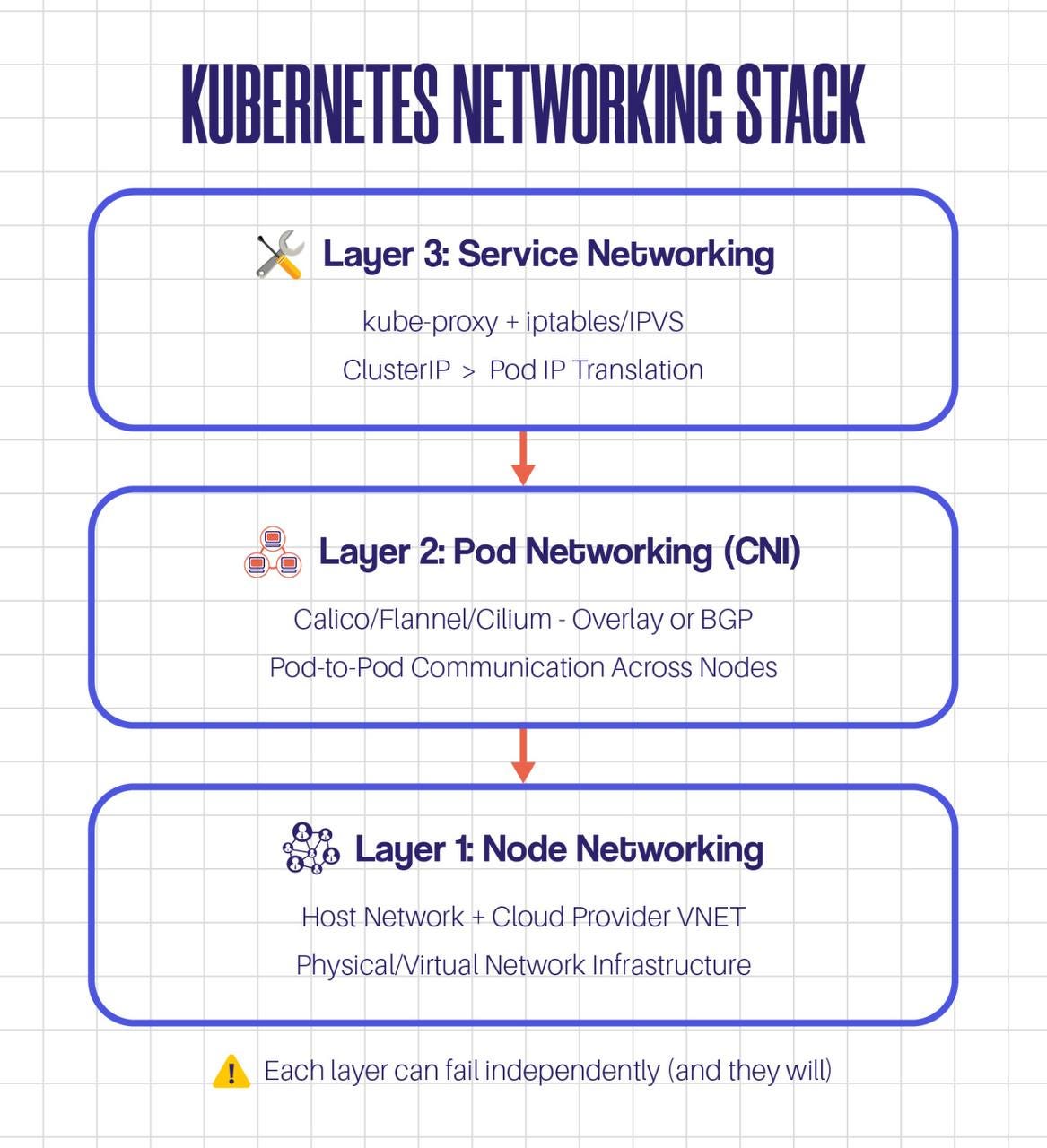
My disaster recovery nightmare? It was a Layer 2 problem masquerading as a Layer 1 problem.
The Real Story: Multi-Region Networking
We run production in Region A (UAE North) and disaster recovery in Region B (UAE Central). Simple, right?
Here’s what was actually happening:
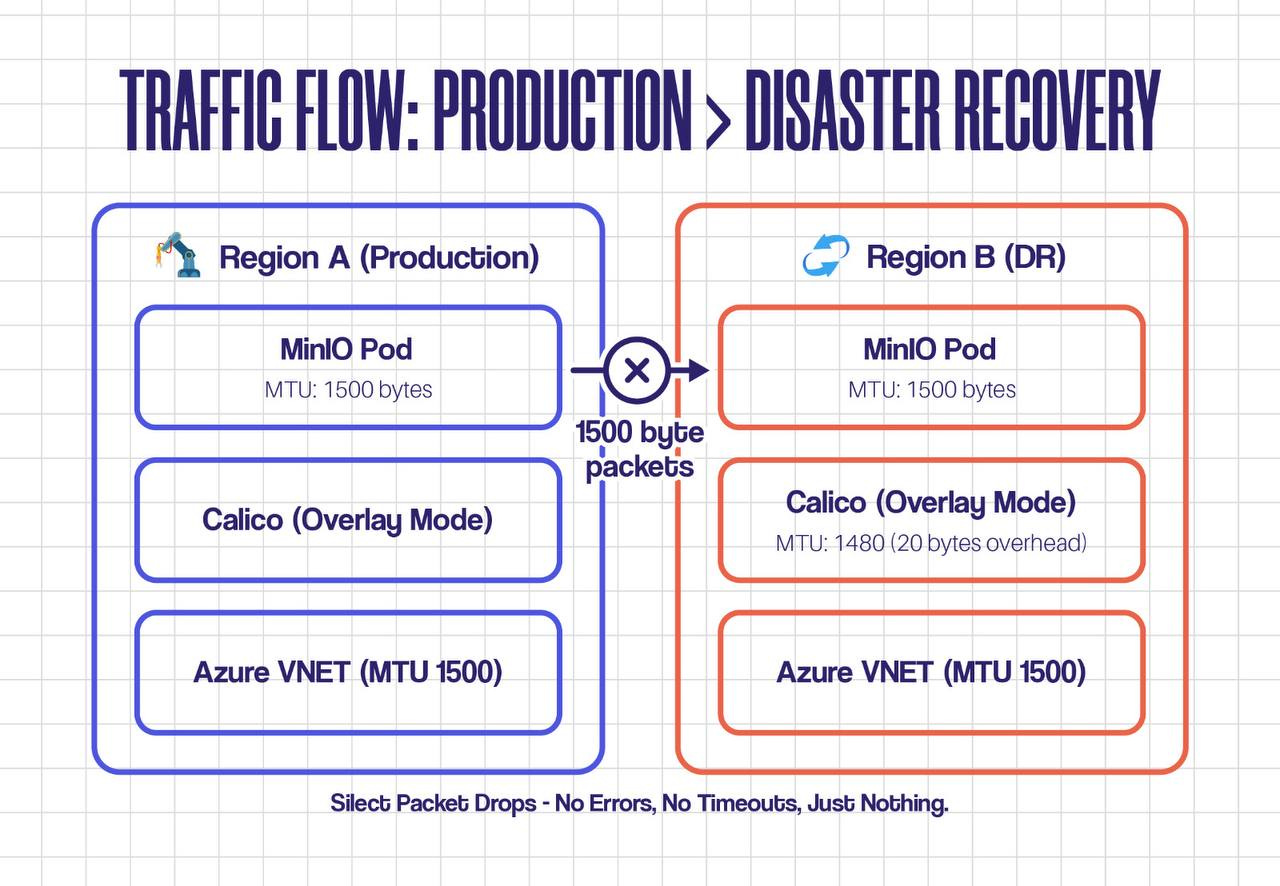
🎯 Key Insight: The MTU mismatch was invisible. Small packets (like ping and DNS queries) worked fine. Large packets (S3 data transfers) got dropped silently. No errors. No logs. Just timeouts.
The Debugging Path That Actually Works
Step 1: Verify Pod-Level Connectivity
# Deploy a debug pod with network tools
kubectl run netshoot --rm -it --image=nicolaka/netshoot -- /bin/bash
# Test basic connectivity
curl -v http://minio-dr.prod.svc.cluster.local:9000
# Check actual packet sizes
ping -M do -s 1472 minio-dr.prod.svc.cluster.local # Success
ping -M do -s 1500 minio-dr.prod.svc.cluster.local # Timeout ← AHA!
Step 2: Check CNI Configuration
# Get Calico node status
kubectl exec -n kube-system calico-node-xxxxx -- calicoctl node status
# Check MTU settings
kubectl get configmap -n kube-system calico-config -o yaml | grep -i mtu
# View actual interface MTU on node
kubectl exec -n kube-system calico-node-xxxxx -- ip link show
Step 3: Packet-Level Analysis
# Capture traffic on pod interface
kubectl exec -it minio-pod -- tcpdump -i any -nn -s0 -v port 9000
# Watch for fragmentation or drops
tcpdump -i any -nn 'ip[6:2] & 0x4000 != 0' # Don't Fragment flag
The Smoking Gun: We saw packets leaving the source pod with DF (Don't Fragment) flag set, but they never arrived at the destination. Classic MTU black hole.
The Fix (and Why It Worked)
We had three options:
Lower the pod MTU (what we did) - Set Calico to 1450 bytes
Increase VNET MTU - Not possible in Azure without recreating VNET
Enable Path MTU Discovery - Unreliable across cloud boundaries
# Updated Calico configuration
kubectl patch configmap -n kube-system calico-config --type merge -p ' { "data": { "veth_mtu": "1450" } }'
# Restart Calico daemonset to apply
kubectl rollout restart daemonset/calico-node -n kube-system
💡 Senior Tip: After changing MTU, recreate all pods. Existing pods won't pick up the new MTU automatically. Plan for rolling restarts.
The 5 Commands That Solve 80% of Network Issues
Bookmark these. Seriously.
# 1. Test connectivity from pod perspective
kubectl exec -it <pod> -- curl -v <endpoint>
# 2. Check CNI logs kubectl logs -n kube-system -l k8s-app=calico-node --tail=100
# 3. Verify service endpoints kubectl get endpoints <service-name> -o wide
# 4. Trace packet path kubectl exec -it <pod> -- traceroute <destination>
# 5. Check iptables rules iptables -L -t nat -n | grep <service-name>
Key Takeaways
Layer thinking saves time - Don’t jump to CNI logs when it might be a VNET issue
MTU matters more than you think - Especially in multi-region or overlay networks
Small packets lie - Always test with realistic payload sizes
Silent failures are real - No error doesn’t mean no problem
Document your network architecture - MTU, CNI mode, routing - write it down