
Production Runbook: etcd Backup and Restore
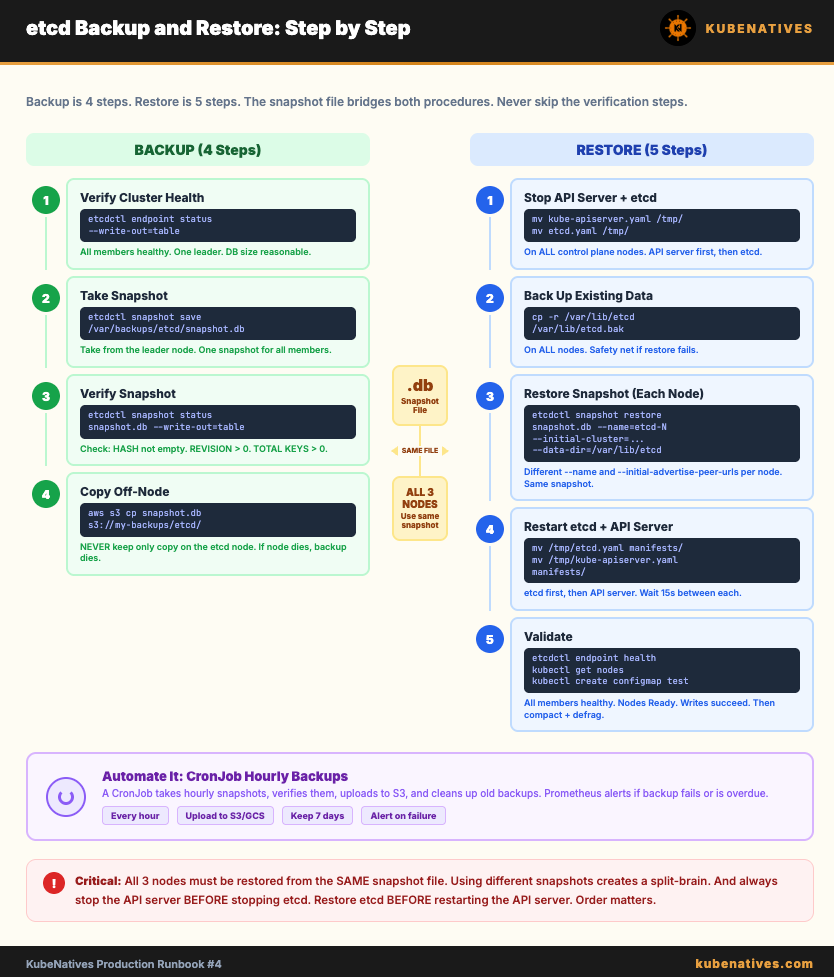
The step-by-step procedure for backing up and restoring etcd. Every command, every validation check, every gotcha.

When to use this runbook:
Setting up automated etcd backups for the first time
Restoring a cluster after etcd data loss
Migrating etcd data between clusters
Testing your disaster recovery procedure
Prerequisites
# Verify etcdctl is installed
etcdctl version

# Set environment variables (adjust for your cluster)
export ETCDCTL_API=3
export ETCD_ENDPOINTS="https://10.0.1.10:2379,https://10.0.1.11:2379,https://10.0.1.12:2379"
export ETCD_CACERT="/etc/kubernetes/pki/etcd/ca.crt"
export ETCD_CERT="/etc/kubernetes/pki/etcd/server.crt"
export ETCD_KEY="/etc/kubernetes/pki/etcd/server.key"

# Verify connectivity
etcdctl --endpoints=$ETCD_ENDPOINTS \
  --cacert=$ETCD_CACERT \
  --cert=$ETCD_CERT \
  --key=$ETCD_KEY \
  endpoint health
Expected output:
https://10.0.1.10:2379 is healthy: successfully committed proposal: took = 2.1ms
https://10.0.1.11:2379 is healthy: successfully committed proposal: took = 2.3ms
https://10.0.1.12:2379 is healthy: successfully committed proposal: took = 1.9ms
If any member is unhealthy, do NOT proceed with restore. Fix the unhealthy member first using Runbook #3 (NOSPACE) or the etcd Debugging Guide.
