
Production Runbook: vLLM OOM Debugging
Your vLLM pod just crashed with OOMKilled. Here is how to find the cause and prevent it from happening again.

When to use this runbook:
vLLM pod killed with OOMKilled (CPU memory)
vLLM pod crashes with CUDA out of memory (GPU memory)
vLLM pod exits with no clear error but restarts repeatedly
Performance degradation before eventual crash
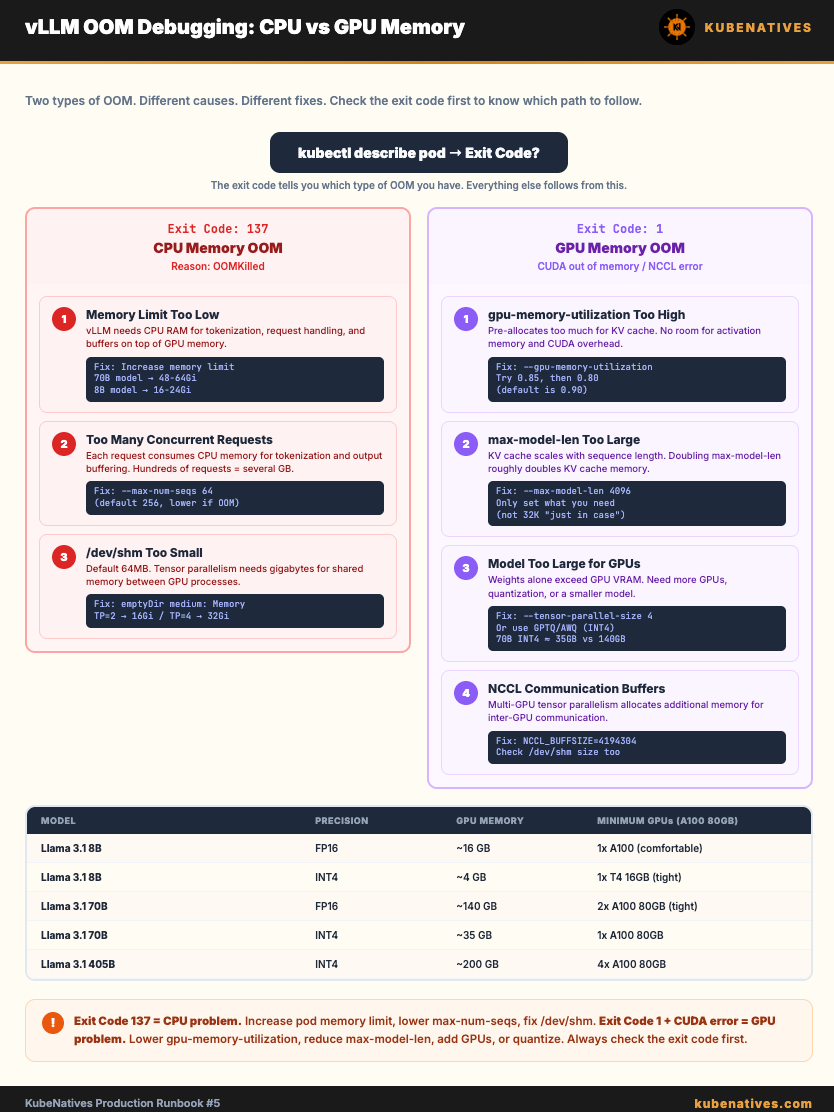
Step 0: Identify Which OOM You Have
There are two types. They have different causes and different fixes.
# Check pod status
kubectl describe pod <vllm-pod> -n <namespace>
CPU OOM (OOMKilled):
State:          Terminated
  Reason:       OOMKilled
  Exit Code:    137
This means the container exceeded its Kubernetes memory limit. The kubelet killed it.
GPU OOM (CUDA out of memory):
State:          Terminated
  Reason:       Error
  Exit Code:    1
Check the logs:
kubectl logs <vllm-pod> -n <namespace> --previous
Look for:
torch.cuda.OutOfMemoryError: CUDA out of memory.
or
RuntimeError: NCCL error: out of memory
This means the model or KV cache exceeded available GPU VRAM.
Part 1: CPU OOM (OOMKilled / Exit Code 137)
Cause 1: Memory limit set too low
vLLM needs CPU memory for model loading, tokenization, request handling, and internal buffers. This is in ADDITION to GPU memory.
# Check current memory limits
kubectl get pod <vllm-pod> -o jsonpath='{.spec.containers[0].resources}'
The fix: Increase the memory limit. Rule of thumb:
8B model:   memory limit = 16-24 Gi
13B model:  memory limit = 24-32 Gi
70B model:  memory limit = 48-64 Gi
resources:
  requests:
    memory: 48Gi    # For 70B model
    cpu: "8"
    nvidia.com/gpu: "2"
  limits:
    memory: 64Gi    # 30% headroom over request
    nvidia.com/gpu: "2"
    # Do NOT set CPU limits (causes throttling)
Important: Do NOT set CPU limits on vLLM pods. CPU limits cause throttling which slows tokenization and request handling. Set CPU requests (for scheduling) but leave limits unset.
