
RDMA and InfiniBand: Why GPU Networking Is Different on Kubernetes
A 70B model split across 8 GPUs moves hundreds of gigabytes per second between nodes. Standard Kubernetes pod networking handles zero of that well. Here is what to run instead.

Single-node GPU workloads are simple. The GPU talks to CPU memory over PCIe, to other GPUs in the same box over NVLink. No network involved. Kubernetes networking never enters the picture.
Multi-node GPU workloads are different. A Llama 70B model split across 2 nodes with 4 GPUs each requires all-reduce operations at every training step or tensor-parallel inference call. That is hundreds of gigabytes per second of cross-node traffic.
The default Kubernetes network stack uses kernel TCP over a CNI like Calico or Cilium. Maximum practical throughput: 10 to 25 Gbps. Round-trip latency: 100 to 500 microseconds.
For distributed GPU training, those numbers are 10 to 100x too slow. The GPUs finish their math and wait on the network. Your $30K per hour H100 cluster becomes a $30K per hour network stall.
This article covers what RDMA and InfiniBand actually are, why they matter for GPU workloads, and how to integrate them with Kubernetes.
What RDMA Actually Does
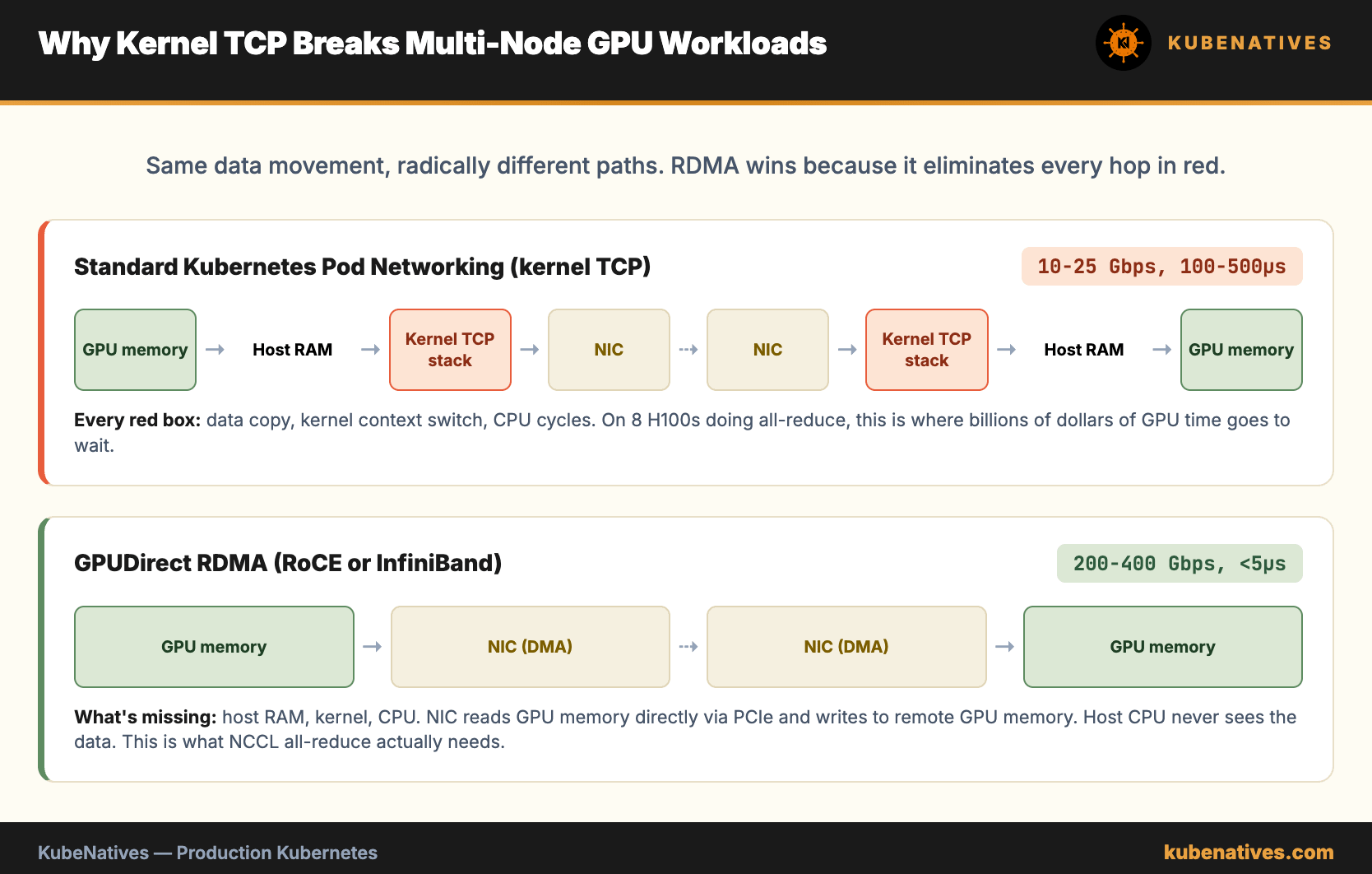
RDMA stands for Remote Direct Memory Access. The name describes the mechanic exactly. One machine reads or writes the memory of another machine directly, without involving either machine’s CPU or operating system kernel.
In a normal TCP send, data goes from application memory, into kernel buffers, through the TCP stack, across the network card, into the other machine’s network card, back up through its kernel, into its application memory. Every hop copies data and switches context.
RDMA skips all of that. The application pins a memory region, hands a pointer to the NIC, and the NIC does DMA directly. The remote NIC receives and writes straight into the target memory region. No kernel involvement on either side.
The result: 200+ Gbps throughput, single digit microsecond latency, and near zero CPU usage on both ends.
For GPU workloads, there is a second layer. GPUDirect RDMA lets the NIC read from and write to GPU memory directly, bypassing host CPU memory entirely. The GPU sends data. The NIC picks it up from GPU memory. It lands in GPU memory on the other side. CPUs and host RAM are not in the path.
This is how NCCL (NVIDIA Collective Communications Library) achieves the kind of throughput distributed training needs.
InfiniBand vs RoCE: The Two Ways to Get RDMA
RDMA is a protocol. You need hardware that supports it. Two options exist in practice.
InfiniBand. A dedicated network technology designed from the start for RDMA. Purpose built switches, cables, and adapters. NVIDIA Quantum-2 InfiniBand delivers 400 Gbps per port. You run a completely separate network alongside your Ethernet for RDMA traffic.
Pros: best performance, lowest latency, deterministic behavior under load. Cons: dedicated hardware, expensive switches, separate cabling, separate management plane.
RoCE (RDMA over Converged Ethernet). Runs RDMA over standard Ethernet hardware. Specifically RoCE v2, which runs over IP and can be routed. Requires Ethernet switches that support priority flow control (PFC) and explicit congestion notification (ECN).
Pros: uses existing Ethernet skills, single network fabric, easier to integrate with existing infrastructure. Cons: performance depends heavily on switch configuration, more sensitive to network congestion, harder to debug.
For greenfield GPU clusters at real scale (256+ GPUs), InfiniBand remains the default. For smaller clusters or shared general purpose infrastructure, RoCE v2 is the pragmatic choice.
Most cloud providers expose RDMA via RoCE. AWS EFA, Azure InfiniBand (rebranded RoCE in some SKUs), GCP compact placement with RoCE. You rarely touch native InfiniBand unless you run bare metal.
The Problem with Standard Kubernetes Pod Networking
A standard Kubernetes pod gets one network interface, typically eth0, configured by the CNI plugin. The interface runs over kernel TCP. Bandwidth is capped by the CNI overlay and the kernel stack.
GPU workloads need three things the default setup does not provide.
Multiple network interfaces. Pods need the standard eth0 for Kubernetes traffic (API server, service discovery, application calls) plus additional high speed interfaces for RDMA traffic. The CNI only gives you one.
Host network level access to the RDMA device. The NIC exposes RDMA resources (queue pairs, protection domains, memory regions) through a device file like /dev/infiniband/uverbs0. Pods need this device mounted and the right capabilities to use it.
CPU pinning and NUMA awareness. RDMA performance depends on the memory being allocated on the same NUMA node as the NIC. GPU workloads already need NUMA affinity to the GPU. The GPU, the NIC, and the pinned memory all need to be on the same NUMA node for peak throughput.
Default Kubernetes ignores all of this. The CNI gives you one interface. Devices are not mounted. NUMA is invisible to the scheduler.
The Stack That Actually Works
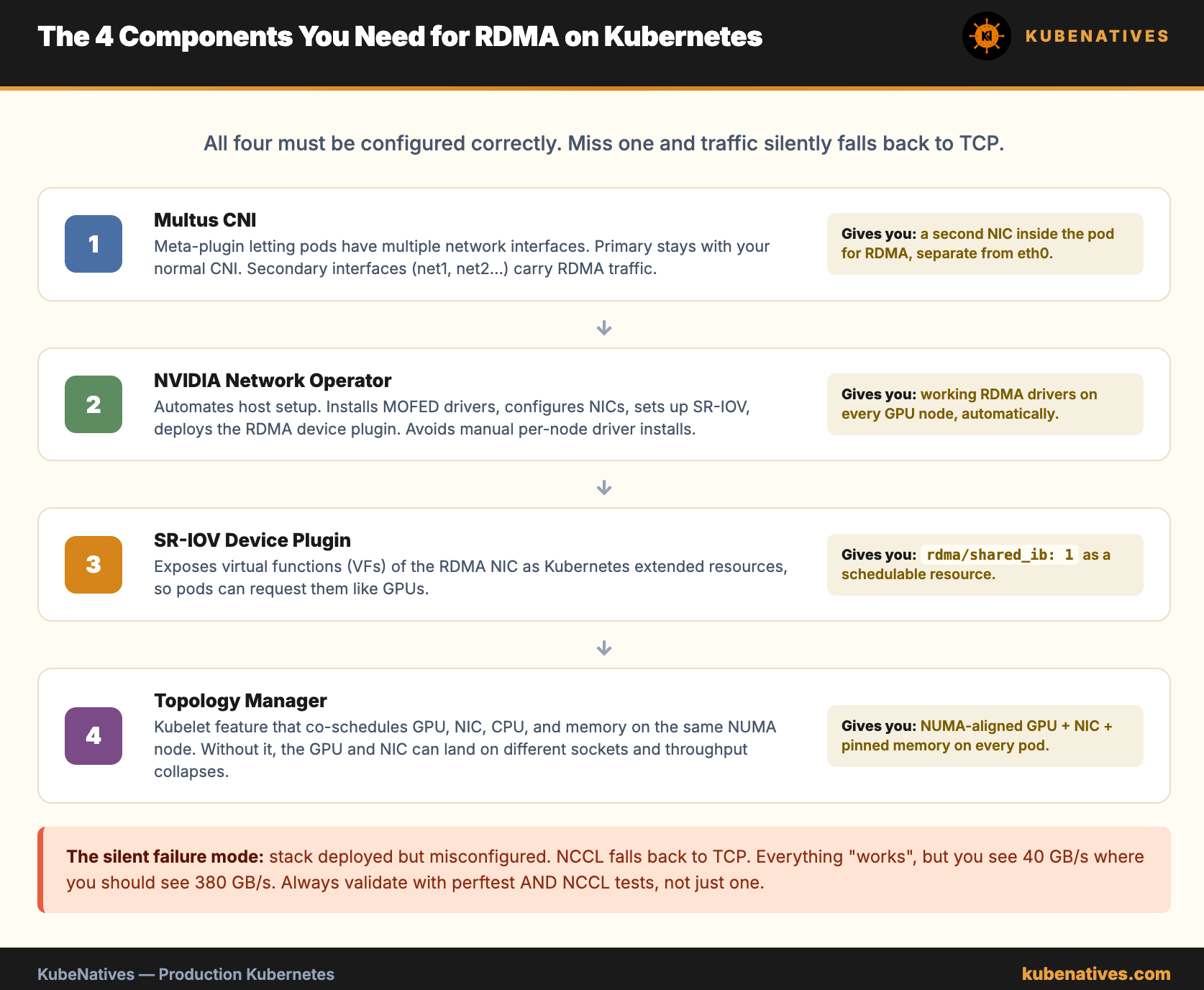
Production RDMA on Kubernetes requires four components working together.
Multus CNI. A meta plugin that lets pods have multiple network interfaces. Multus delegates the primary interface to your normal CNI (Calico, Cilium, whatever) and lets secondary interfaces use different plugins. This is how pods get eth0 for Kubernetes traffic and net1 through net4 for RDMA.
apiVersion: "k8s.cni.cncf.io/v1"
kind: NetworkAttachmentDefinition
metadata:
  name: rdma-net
spec:
  config: |
    {
      "cniVersion": "0.3.1",
      "type": "macvlan",
      "master": "ib0",
      "mode": "bridge",
      "ipam": {
        "type": "whereabouts",
        "range": "10.56.0.0/16"
      }
    }
Pods reference this definition via annotation.
metadata:
  annotations:
    k8s.v1.cni.cncf.io/networks: rdma-net
NVIDIA Network Operator. Automates the host setup. Installs the MOFED drivers (Mellanox OpenFabrics Enterprise Distribution), configures NICs, sets up SR-IOV if using virtualized NICs, and deploys the RDMA device plugin. Without this, every node requires manual driver installation.
SR-IOV Device Plugin. Exposes virtual functions (VFs) of the RDMA NIC as Kubernetes extended resources. Pods request RDMA VFs the same way they request GPUs.
resources:
  requests:
    nvidia.com/gpu: 8
    nvidia.com/hostdev: 4
    rdma/shared_ib: 1
Topology Manager. Kubernetes feature (stable since 1.27) that coordinates scheduling decisions across CPU, memory, GPU, and device plugins. Enable it with --topology-manager-policy=single-numa-node to ensure the GPU, the NIC, and the pinned memory all land on the same NUMA node.
# kubelet configuration
topologyManagerPolicy: "single-numa-node"
cpuManagerPolicy: "static"
memoryManagerPolicy: "Static"
reservedMemory:
  - numaNode: 0
    limits:
      memory: 1100Mi
This is where most teams get stuck. The components exist. The integration between them is fragile. Single NUMA policy can cause pods to fail scheduling if the NUMA node is full. Relaxing to best-effort gives scheduling flexibility but loses guaranteed performance.
Validating the Setup
Once the stack is deployed, a pod should see multiple interfaces and RDMA devices.
# Inside the pod
$ ip link show
1: lo: ...
2: eth0: ...                    # Kubernetes pod network
3: net1@if123: ...              # RDMA interface via Multus

$ ibv_devices
    device          	   node GUID
    ------          	----------------
    mlx5_0          	ec0d9a0300xxxxxx

$ ibv_devinfo mlx5_0
hca_id:	mlx5_0
	transport:			InfiniBand (0)
	fw_ver:				28.40.1000
	link_layer:			Ethernet     # or InfiniBand for native IB
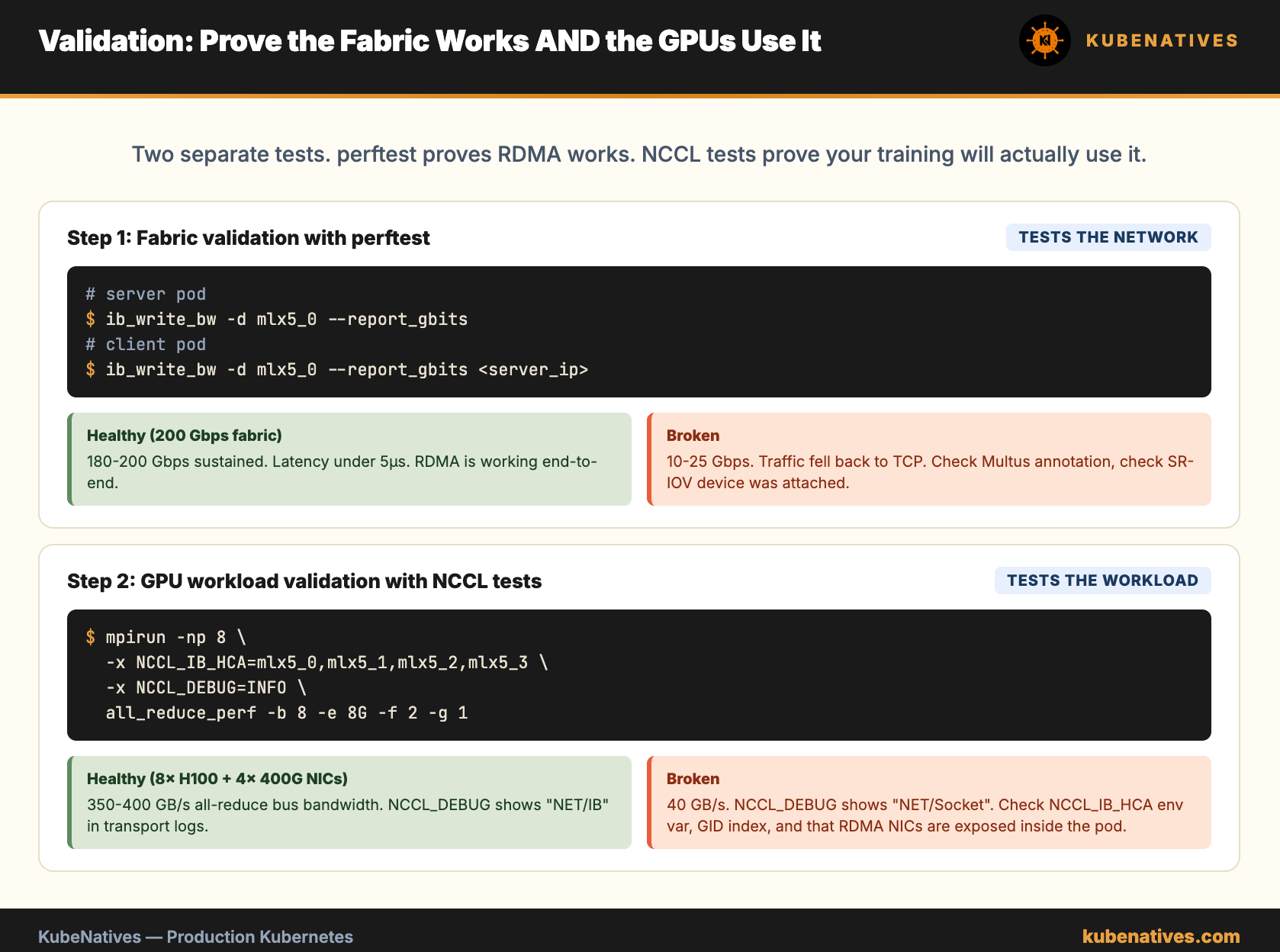
Then benchmark. perftest is the standard tool.
# On one pod
$ ib_write_bw -d mlx5_0 --report_gbits

# On another pod
$ ib_write_bw -d mlx5_0 --report_gbits <server_pod_ip>
Healthy numbers: 180 to 200 Gbps on 200 Gbps fabrics. 380+ Gbps on 400 Gbps fabrics. If you see 10 to 25 Gbps, the traffic is falling back to TCP over the default network. The pods are not actually using RDMA.
NCCL Tests as the Real Benchmark
perftest proves RDMA works. NCCL tests prove GPU workloads actually use it.
# Inside a pod with 8 GPUs and RDMA NICs
$ mpirun -np 8 --allow-run-as-root \
  -mca btl_tcp_if_include eth0 \
  -x NCCL_IB_HCA=mlx5_0,mlx5_1,mlx5_2,mlx5_3 \
  -x NCCL_IB_GID_INDEX=3 \
  -x NCCL_DEBUG=INFO \
  all_reduce_perf -b 8 -e 8G -f 2 -g 1
The output shows bus bandwidth. On an 8x H100 node with 4x 400 Gbps NICs, you should see all reduce bandwidth around 350 to 400 GB/s for large messages. If you see 40 GB/s, NCCL is not using RDMA. Check the environment variables, check the NIC assignments, check that the RDMA interfaces are actually exposed to the pod.
When You Need This
Not every GPU workload needs RDMA. Single node training and single node inference do not. The GPUs in a single box talk to each other over NVLink, which is already faster than any network.
RDMA matters when:
Distributed training across nodes. Any model where the training job spans more than one physical machine. The all reduce after each step is the bottleneck. RDMA cuts it by 10 to 100x.
Tensor parallel inference across nodes. Very large models (70B, 405B) that do not fit on a single node split their layers across multiple machines. Every forward pass requires cross node communication. RDMA is table stakes.
Parameter server architectures. Less common now but still used in some recommendation model training.
High bandwidth data loading. Feeding training jobs from a distributed object store at line rate. GPUDirect Storage with RDMA lets GPUs read training data from NVMe arrays without going through CPU memory.
If your GPU workloads fit entirely on single nodes, skip this complexity entirely. Kubernetes default networking is fine. Come back when you need to scale past one machine.
The Bottom Line
RDMA is not optional for multi node GPU workloads. It is the difference between a cluster that computes and a cluster that waits on the network.
The stack is real but workable. Multus for multiple interfaces. NVIDIA Network Operator for host setup. SR-IOV Device Plugin for resource scheduling. Topology Manager for NUMA alignment. Production deployments use all four.
The hardest part is not any single component. It is the integration. A working RDMA cluster has 20 different things configured correctly in the right order. Miss one and traffic silently falls back to TCP. Your cluster computes. Nothing errors. The throughput is just 10x lower than it should be.
Validate with perftest for the fabric. Validate with NCCL tests for the GPU workload. Only trust the setup once both confirm the numbers you expected.
This concludes the first 26 weeks of KubeNatives. The journey has covered control plane internals, GPU infrastructure, model serving, LLMOps patterns, and now the network fabric that holds it all together. Next quarter goes deeper into each pillar with advanced topics including Dynamic Resource Allocation, pod priority for ML workloads, LLM gateway patterns, and multi cluster GPU federation. Thank you for reading.