
Service Mesh Debugging: When Istio Breaks Your Inference Pipeline
You installed Istio for mTLS and traffic management. Now your vLLM pods take 30 seconds to respond. Here is what went wrong and how to fix it.

Istio adds a sidecar proxy to every pod. The proxy handles mTLS, traffic routing, observability, and retries. For microservices with short request response cycles, the overhead is 1 to 3ms per request. Most teams never notice.
For LLM inference, the same proxy introduces problems that do not exist in typical microservice architectures. Long lived streaming connections, large response bodies, and GPU sensitive latency make Istio defaults a bad fit.
Your vLLM pods are not broken. Your model is not broken. Istio is working exactly as designed. The design just does not match inference workloads.
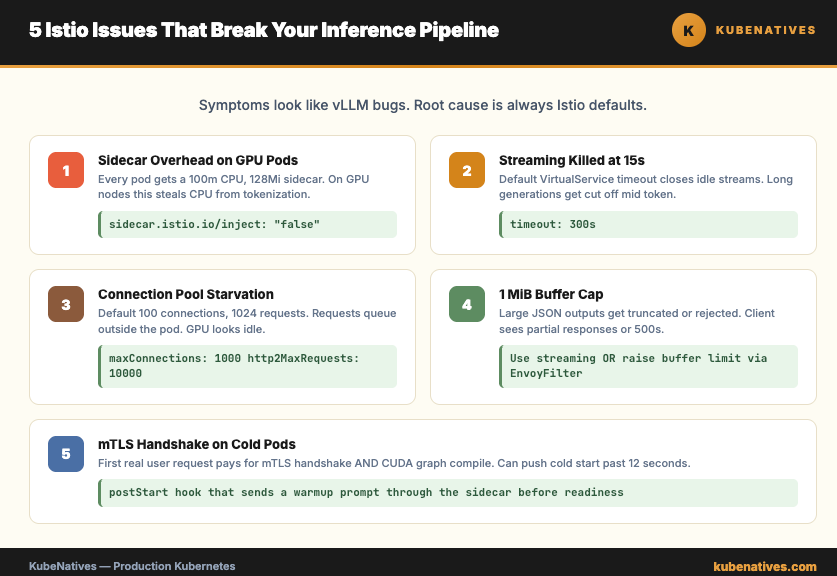
This article covers the 5 most common Istio issues with inference pipelines and how to fix each one.
Issue 1: Sidecar Injection on GPU Pods
By default, Istio injects a sidecar proxy into every pod in labeled namespaces. GPU pods get a sidecar too. The sidecar consumes CPU and memory that could go to the inference workload.
The sidecar itself is not the problem. The problem is the sidecar default resource requests. 100m CPU and 128Mi memory, per pod. On a GPU node where every CPU core matters for tokenization and request handling, this overhead adds up across pods.
Fix options:
Option 1: Disable sidecar injection for inference pods.
apiVersion: apps/v1
kind: Deployment
metadata:
  name: vllm
spec:
  template:
    metadata:
      annotations:
        sidecar.istio.io/inject: "false"
If your inference pods do not need mTLS to the model clients, skip the sidecar. You keep Istio everywhere else in the cluster. The GPU pods run clean.
Option 2: Keep the sidecar but tune it.
annotations:
  sidecar.istio.io/proxyCPU: "50m"
  sidecar.istio.io/proxyMemory: "64Mi"
Lower the sidecar resource requests if you still want mTLS. Most inference sidecars do not need 100m CPU.
Issue 2: Streaming Responses Terminated Early
vLLM supports token streaming over HTTP. The client opens a connection, sends a prompt, and receives tokens as they generate. A long generation might take 30 to 60 seconds.
Istio default timeouts kill these connections before generation finishes.
The culprit is usually the Envoy idle timeout. For a VirtualService, the default is 15 seconds of no activity. Streaming LLM output sends tokens intermittently. Between tokens, the connection sits idle. 15 seconds later, Envoy closes the stream.
The fix:
apiVersion: networking.istio.io/v1beta1
kind: VirtualService
metadata:
  name: vllm
spec:
  hosts:
  - vllm.inference.svc.cluster.local
  http:
  - route:
    - destination:
        host: vllm
    timeout: 300s
Set the timeout to cover your longest expected generation. 5 minutes is safe for most workloads. Longer if you serve 70B models or reasoning models with multi minute thinking phases.
Also check the connection level idle timeout in the DestinationRule. The default there is 1 hour, which is fine, but some teams override it and forget.
Issue 3: Connection Pool Limits Starving the Inference Service
Istio DestinationRule defaults limit the number of concurrent connections and pending requests. For microservices, this protects against cascading failures. For inference, it starves the service.
Default settings to watch:
connectionPool:
  tcp:
    maxConnections: 100
  http:
    http1MaxPendingRequests: 1024
    http2MaxRequests: 1024
Under heavy inference traffic, you hit the connection limit before you hit the GPU limit. Requests queue outside the pod. Users see 503 errors. GPU utilization looks fine. Your instinct is to scale up replicas. That does not help. The ceiling is in Istio, not in vLLM.
The fix:
apiVersion: networking.istio.io/v1beta1
kind: DestinationRule
metadata:
  name: vllm
spec:
  host: vllm
  trafficPolicy:
    connectionPool:
      tcp:
        maxConnections: 1000
      http:
        http1MaxPendingRequests: 10000
        http2MaxRequests: 10000
Raise the limits significantly for inference services. The actual bottleneck should be GPU throughput, not proxy accounting.
Issue 4: Envoy Buffer Limits on Large Response Bodies
A single inference response can be hundreds of kilobytes. A long context completion or a structured output with a large JSON schema can push past a megabyte.
Envoy has a default buffer limit of 1 MiB per request or response. Larger bodies get truncated or rejected. The client sees a partial response or a 500 error.
The fix:
Set the buffer size on the Envoy filter.
apiVersion: networking.istio.io/v1alpha3
kind: EnvoyFilter
metadata:
  name: increase-buffer-limit
spec:
  configPatches:
  - applyTo: NETWORK_FILTER
    match:
      listener:
        filterChain:
          filter:
            name: "envoy.filters.network.http_connection_manager"
    patch:
      operation: MERGE
      value:
        typed_config:
          "@type": type.googleapis.com/envoy.extensions.filters.network.http_connection_manager.v3.HttpConnectionManager
          max_request_headers_kb: 96
          stream_idle_timeout: 300s
For large responses specifically, configure the per route buffer size or disable buffering on the inference route. Streaming already avoids buffering the full body. If you are using streaming, this issue does not apply. If you are not, switch to streaming before you fight Envoy buffers.
Issue 5: mTLS Handshake on Cold Pods
Istio enforces mTLS between pods by default. Every connection starts with a certificate exchange. Normally this adds 5 to 15ms to the first request.
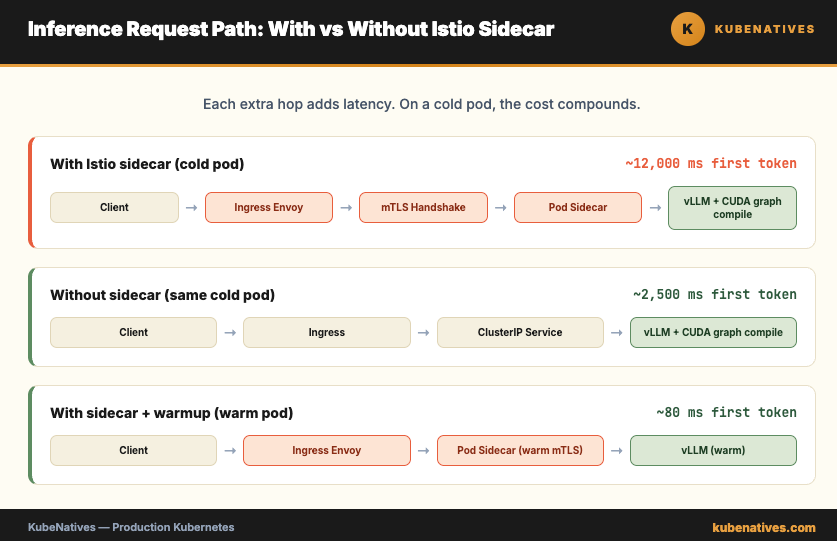
For inference pods, the first request already carries significant overhead. vLLM compiles CUDA graphs on the first inference call. The cold start penalty can be 2 to 10 seconds depending on the model. Add the mTLS handshake on top and the user sees a 12 second response on the first call.
The handshake itself is cheap per request. The problem is that warmup probes, readiness checks, and synthetic traffic often do not exercise the mTLS path. Your first real user request pays for the handshake and for the cold model at the same time.
The fix:
Pre warm the pod with a real inference request during startup. A postStart hook that sends a short prompt through the sidecar forces the certificate exchange and the CUDA graph compile before the pod is marked ready.
lifecycle:
  postStart:
    exec:
      command:
      - /bin/sh
      - -c
      - |
        sleep 30 && \
        curl -X POST http://localhost:8000/v1/completions \
          -H "Content-Type: application/json" \
          -d '{"model":"meta-llama/Llama-3.1-8B-Instruct","prompt":"warmup","max_tokens":1}'
Combine this with a readiness probe that waits for the warmup to complete. New users never hit a cold pod.
When to Use Istio vs When to Skip It
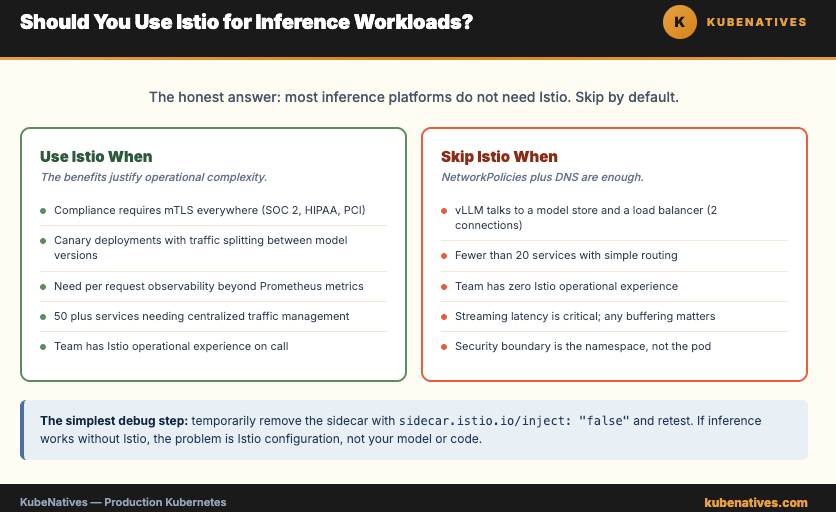
The honest answer: most inference platforms do not need Istio.
vLLM talks to a model store and a load balancer. That is 2 connections. NetworkPolicies handle isolation. DNS handles service discovery. Prometheus handles observability. You get 90% of what Istio provides, at zero proxy overhead, with 10% of the operational complexity.
Use Istio when:
Compliance requires mTLS between all services (SOC 2, HIPAA, PCI). You need canary deployments with traffic splitting between model versions. You need detailed per request observability beyond Prometheus metrics. You have 50 plus services and need centralized traffic management.
Skip Istio when:
Your inference pipeline has fewer than 20 services. Your team does not have Istio operational experience. Streaming latency is critical and any buffering overhead matters. Your security boundary is the namespace, not the pod.
The simplest debug step: temporarily remove the sidecar with sidecar.istio.io/inject: "false" and test. If inference works without Istio, the problem is Istio configuration. Add the sidecar back and fix the specific issue.
The Bottom Line
Istio is not broken. It is doing exactly what it was designed to do. The design assumes short lived HTTP requests between stateless microservices. Inference workloads violate every assumption in that design.
The 5 issues in this article cover 90% of Istio inference problems in production. Sidecar overhead. Streaming timeouts. Connection pool limits. Buffer sizes. Cold start handshakes.
Fix them once and document the pattern. Every new inference service in your cluster inherits the right configuration. Nobody spends a Saturday chasing 30 second latency that turned out to be a default timeout.
The service mesh is a tool. Not a requirement.
Next week: A/B Testing LLM Models in Production with Kubernetes.
If you are running production Kubernetes clusters, I cover control plane internals, GPU infrastructure, and model serving every week. Subscribe at kubenatives.com.