
Stacked vs External etcd: The Production Decision Nobody Explains
Why kubeadm’s default isn’t what you’ll find in production — and when it actually matters.

When you bootstrap a Kubernetes cluster with kubeadm init, it makes a choice for you: stacked etcd topology. The etcd database runs directly on your control plane nodes, right alongside the API server.
Simple. Clean. Done.
But scroll through any serious production cluster documentation — financial services, large-scale SaaS, or anything with “five nines” in the SLA — and you’ll find something different: external etcd clusters running on dedicated nodes.
Why? And more importantly, does it matter for your cluster?
Let’s break it down.
What’s Actually Different
Stacked etcd puts everything on the same nodes:
Control Plane Node 1:
├── kube-apiserver
├── kube-scheduler
├── kube-controller-manager
└── etcd  ← lives here too
Each control plane node runs its own etcd member. Three nodes, three etcd members, one cluster. The API server talks to its local etcd instance.
External etcd separates concerns:
Control Plane Nodes (x3):        etcd Nodes (x3):
├── kube-apiserver               └── etcd member (NVMe storage)
├── kube-scheduler
└── kube-controller-manager
The API servers connect to the etcd cluster over the network. Six nodes minimum instead of three.
Simple difference. Significant implications.
The key insight: you’re trading a tiny amount of predictable network latency (~0.1-0.5ms) for the elimination of unpredictable disk contention. That’s a good trade every time.
The Failure Domain Problem
Here’s what keeps SREs up at night with stacked topologies.
When a control plane node dies in a stacked setup, you lose two things simultaneously:
A control plane instance (API server, scheduler, controller-manager)
An etcd cluster member
These are now the same failure domain.
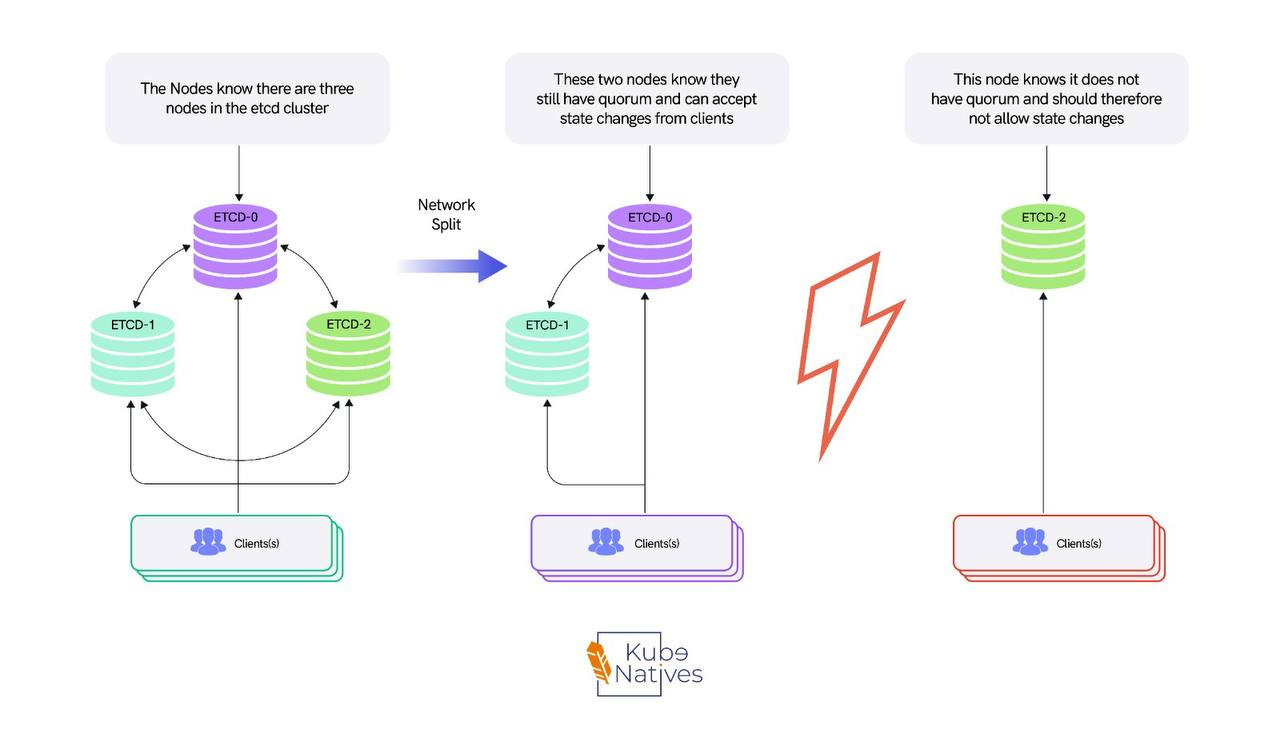
With 3 nodes, you can lose 1 and maintain quorum. But you’ve gone from “we can lose a node” to “if we lose one more node, the cluster is read-only” in a single failure.
Lose 2, and your entire cluster is down — not just degraded, but down. The API server can’t function without etcd.
External etcd decouples this completely. Lose a control plane node? Your etcd cluster is unaffected — all 3 members remain healthy, with full fault tolerance.
Lose an etcd node? Your control plane keeps serving from the remaining healthy etcd members. You’ve created two independent failure domains that degrade gracefully instead of catastrophically.
The Quorum Math
etcd uses Raft consensus. Quick refresher on why cluster sizing matters:
Quorum = (n / 2) + 1
Cluster Size Quorum Needed Failure Tolerance 3 nodes 2 1 failure 5 nodes 3 2 failures 7 nodes 4 3 failures
With stacked etcd, your etcd failure tolerance equals your control plane failure tolerance. They’re locked together.
With external etcd, you could run 3 control plane nodes with a 5-node etcd cluster — giving your data layer more resilience than your compute layer. Whether you should do this depends on your SLA, but the option exists.
The Disk I/O Problem Nobody Warns You About
Beyond failure domains, this is the issue that actually bites you in production: disk I/O contention.
etcd is extremely sensitive to disk latency. Every write goes to the WAL (Write-Ahead Log), and every commit needs fsync to persist. The official recommendation is fsync latencies under 10ms.
The API server, meanwhile, is CPU and memory hungry — handling authentication, authorization, admission webhooks, serialization, and potentially thousands of watch connections. It’s also doing disk I/O for its own operations.
When they share a node, they fight over different resources that happen to live on the same machine. And the feedback loop is vicious:
A routine deployment triggers a spike in API server activity
API server disk I/O gets noisy, which degrades etcd fsync latency
etcd fsync latency spikes cause the Raft leader to fall behind
The leader falls behind enough to trigger a leader election
Leader election makes the API server retry all its etcd calls
The retries create even more disk pressure
I’ve seen this pattern take a healthy cluster to a degraded state in under 60 seconds. It starts with a normal Friday deployment and ends with everyone on a bridge call.
What We Changed (and What It Fixed)
In our production environment running H100 GPU clusters, we moved to external etcd on dedicated nodes with NVMe SSDs. Here’s what changed:
Before (stacked):
etcd WAL fsync p99: 15-25ms during peak hours
API server request latency p99: 800ms+ during large deployments
Leader elections: 2-3 per week (each one causing a 3-5 second write freeze)
One incident where a large
kubectl get pods --all-namespacesquery from a monitoring tool caused enough memory pressure to crash both the API server and etcd on the same node
After (external etcd on NVMe):
etcd WAL fsync p99: 2-4ms consistently
API server request latency p99: dropped ~40%
Leader elections: zero unplanned elections in 6 months
No more shared-resource incidents — etcd doesn’t care what the API server is doing because they’re not on the same machine
The NVMe part matters. etcd’s performance is almost entirely disk-bound. Regular SSDs are OK.
Spinning disks are a disaster. NVMe gives you sub-millisecond fsync latency that etcd loves. If you’re going to the trouble of running external etcd, don’t put it on slow storage — you’d be solving half the problem.
How to Monitor etcd Health (Regardless of Topology)
Whether stacked or external, these are the metrics that tell you if etcd is healthy:
etcd_disk_wal_fsync_duration_seconds — The most important metric. This is how long it takes etcd to write to the WAL and call fsync. Under 10ms is healthy. Above 10ms is degraded. Above 25ms and you’re at risk of leader elections.
etcd_server_leader_changes_seen_total — Track this over time. More than 1 leader change per hour means instability. In a healthy cluster, this should be zero during normal operations.
etcd_mvcc_db_total_size_in_bytes — The database size. etcd performance degrades significantly above 8GB. If you’re above 2GB, check that compaction and defragmentation are working. Run etcdctl compact and etcdctl defrag on a schedule.
etcd_network_peer_round_trip_time_seconds — For external etcd, this shows network latency between members. Should be under 5ms. If it’s higher, check your network configuration.
etcd_server_proposals_failed_total — Failed Raft proposals. If this is increasing, etcd members are having trouble reaching consensus. Check for network partitions or slow members.
# Quick health check script
#!/bin/bash
echo "=== etcd Cluster Health ==="
etcdctl endpoint health --write-out=table

echo "=== Member Status ==="
etcdctl endpoint status --write-out=table

echo "=== DB Size Check ==="
DB_SIZE=$(etcdctl endpoint status --write-out=json | jq '.[0].Status.dbSize')
DB_SIZE_MB=$((DB_SIZE / 1024 / 1024))
echo "Database size: ${DB_SIZE_MB}MB"
if [ $DB_SIZE_MB -gt 2000 ]; then
    echo "WARNING: DB size above 2GB. Check compaction."
fi
The Decision Framework
Not every cluster needs external etcd. Here’s how I think about it:
Stay stacked when:
Your cluster is under 100 nodes
You’re running dev/staging environments
Your workloads are relatively stable (not constantly scaling up/down)
You’re running on decent SSDs (not spinning disks)
Your etcd WAL fsync latency stays consistently under 10ms
You don’t have dedicated infrastructure engineers
Cost is a primary concern (3 nodes vs 6)
Move to external etcd when:
Your cluster exceeds 100 nodes
You’re running GPU workloads with frequent scheduling churn
Your etcd WAL fsync latency regularly exceeds 10ms
You’ve experienced unplanned leader elections
You need to scale the control plane and etcd independently
Your SLA requires that losing a single node cannot reduce etcd fault tolerance to zero
You need independent upgrade cycles for etcd and the control plane
You’re building a multi-tenant platform
The 10ms Rule
If etcd_disk_wal_fsync_duration_seconds is regularly above 10ms on your stacked nodes, you have a disk contention problem.
External etcd on NVMe is the fix. Don’t try to optimize around it — separate the workloads.
The Migration Path: Stacked to External
Migrating from stacked to external etcd is non-trivial — it’s not a “flip a flag” operation. But it’s a well-understood process. Here’s the high-level approach:
Set up 3 new dedicated etcd nodes with NVMe storage. Install etcd, configure TLS certificates, and form a new cluster.
Snapshot your existing etcd data. Use
etcdctl snapshot save. This is your safety net. Test the restore process before you start.Add the new external etcd members to your existing cluster one at a time using
etcdctl member add. This expands your cluster temporarily (e.g., from 3 to 4, then 5, then 6 members).Reconfigure your API servers to point to the new external etcd endpoints. Update the
--etcd-serversflag. This can be done as a rolling update.Remove the old stacked etcd members one at a time using
etcdctl member remove. Each removal must maintain quorum.Verify health at every step. Check
etcdctl endpoint healthandetcdctl endpoint statusafter every member change.
The critical rule: never drop below quorum during migration. If you have 3 stacked members and add 3 external members, you have 6 total (quorum = 4).
Remove stacked members one at a time: 5 members (quorum = 3), 4 members (quorum = 3), 3 external members (quorum = 2). Always maintain majority.
If you know you’ll eventually need external etcd, starting there might save you a painful migration later.
But “eventually” is doing a lot of work in that sentence. Start with stacked, monitor the metrics, and migrate when the data tells you to.
The Cost Conversation
External etcd means more nodes. Three dedicated machines for etcd is real cost. Is it worth it?
For a 500+ node cluster running GPU workloads at $30K/GPU/month, the cost of 3 dedicated etcd nodes (which don’t need GPUs — a standard compute instance with NVMe is fine) is negligible compared to the cost of a control plane outage that freezes your GPU scheduling for 30 minutes.
For a 20-node dev cluster? Probably not worth it. Stacked is fine. The economics only make sense when the blast radius of a control plane issue justifies the additional infrastructure cost.
Quick Reference
Bottom Line
Stacked etcd is a reasonable default for getting started. It’s not a bad topology — it’s the pragmatic topology.
But it’s a topology that trades operational safety for setup simplicity. As your cluster grows — especially if you’re running workloads where scheduling downtime means expensive GPUs sitting idle — external etcd isn’t an optimization. It’s risk management.
The signals that it’s time to move: fsync latency above 10ms, unplanned leader elections, or any incident where an API server problem cascaded into an etcd problem because they share a node.
Separate the stateless from the stateful. Let the API server be replaceable. Let etcd be protected.
That’s the production pattern.
Next week: How vLLM serves models on Kubernetes — PagedAttention, continuous batching, and why your first deployment will probably OOM.
If you found this useful, share it with your team. If you’re building inference infrastructure on Kubernetes, I cover this intersection every week at KubeNatives.