
Unlocking Secure Access: Mastering OAuth in Cloud-Native Environments
A Comprehensive Guide to OAuth 2.0 for Kubernetes and Cloud-Native Applications

What is OAuth?
OAuth is an open-standard authorization protocol that allows a user to grant a third-party application access to their resources (e.g., data or services) without sharing their credentials (like a password). Instead, OAuth uses access tokens to facilitate secure, delegated access.
Key Purpose: Enable secure, user-controlled access to resources across systems.
Not Authentication: OAuth is about authorization (what a user can do), not authentication (who the user is). However, it’s often paired with authentication protocols like OpenID Connect.
Versions: OAuth 2.0 is the most widely used version today, with OAuth 2.1 emerging as a streamlined update. OAuth 1.0 is largely deprecated.
How OAuth Works: The Flow
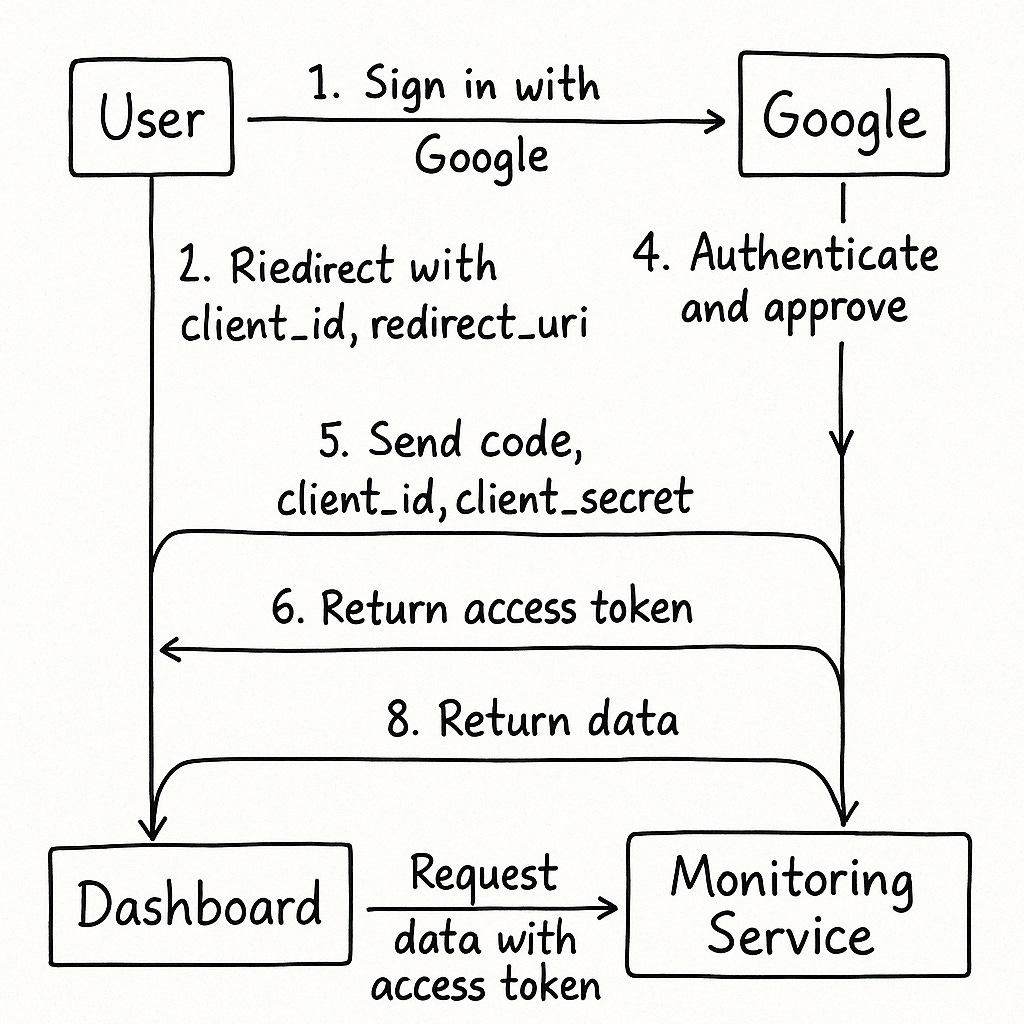
Let’s break down the OAuth 2.0 flow with a practical example: Imagine you’re using a Kubernetes dashboard (the client) to access your cluster’s metrics stored in a monitoring service (the resource server), and you log in via a third-party identity provider like Google (the authorization server).
Key Roles in OAuth
Resource Owner: The user (you) who owns the data (e.g., your cluster metrics).
Client: The application requesting access (e.g., the Kubernetes dashboard).
Authorization Server: The server that authenticates the user and issues tokens (e.g., Google’s OAuth server).
Resource Server: The server hosting the protected resources (e.g., the monitoring service API).
OAuth 2.0 Flow (Authorization Code Grant)
This is the most common flow for web applications. Here’s how it works:
User Initiates Access:
You log into the Kubernetes dashboard and choose “Sign in with Google.”
The dashboard redirects you to Google’s authorization server, including a
client_id(identifying the dashboard) and aredirect_uri(where Google will send you back).
User Authenticates:
You log into Google with your credentials.
Google asks you to approve the dashboard’s request to access specific data (e.g., your profile or metrics).
Authorization Code Issued:
After you approve, Google redirects you back to the dashboard’s
redirect_uriwith a temporary authorization code.
Token Exchange:
The dashboard sends the authorization code, its
client_id, and aclient_secret(a secure key) to Google’s token endpoint.Google verifies the code and responds with an access token (and optionally a refresh token).
Accessing Resources:
The dashboard uses the access token to request your metrics from the monitoring service.
The monitoring service validates the token and returns the requested data.
Token Refresh (Optional):
Access tokens have a limited lifespan (e.g., 1 hour). If the dashboard has a refresh token, it can request a new access token without user interaction.
Diagram of the Flow
OAuth in Kubernetes
In Kubernetes, OAuth is commonly used to secure access to the cluster’s API server or integrate with external identity providers. Here’s how it fits in:
Kube-API Authentication: Kubernetes supports OAuth 2.0 via OpenID Connect (OIDC) for user authentication. For example, you can configure the API server to validate tokens issued by an identity provider like Keycloak or Google.
Service Account Tokens: Kubernetes itself uses a form of OAuth-like tokens (JWTs) for service accounts to authenticate workloads to the API server or external services.
Cluster Dashboards: Tools like the Kubernetes Dashboard or Lens use OAuth to let users log in via external identity providers, ensuring secure access to cluster resources.
RBAC Integration: OAuth tokens often carry user or group information (e.g., via JWT claims), which Kubernetes maps to Role-Based Access Control (RBAC) policies to determine what the user can do.
Example: Configuring OAuth with Keycloak
To integrate OAuth with Kubernetes using Keycloak:
Set up Keycloak as your identity provider and create a client for your Kubernetes dashboard.
Configure the Kubernetes API server with OIDC flags (e.g.,
--oidc-issuer-url,--oidc-client-id).Map Keycloak groups to Kubernetes RBAC roles using a
ClusterRoleBinding.Users log in via Keycloak, and the API server validates their tokens.
Best Practices for OAuth in Cloud-Native Apps
Use Secure Flows:
For web apps, use the Authorization Code Grant with PKCE (Proof Key for Code Exchange) to enhance security.
For single-page apps or mobile apps, include PKCE to prevent code interception.
Limit Scopes:
Request only the permissions (scopes) your application needs. For example, don’t request full access to a user’s data if you only need their email.
Secure Token Storage:
Store access tokens securely (e.g., in memory or encrypted storage).
Never expose tokens in URLs or client-side scripts.
Use Short-Lived Tokens:
Access tokens should expire quickly (e.g., 1 hour). Use refresh tokens for long-lived access.
Validate Tokens:
Resource servers must validate tokens (e.g., check signatures, issuer, and audience) before granting access.
Monitor and Log:
In Kubernetes, log OAuth token usage and monitor for suspicious activity using tools like Prometheus or Fluentd.
Common OAuth Pitfalls
Overfetching Scopes: Requesting unnecessary permissions can erode user trust.
Insecure Redirect URIs: Ensure
redirect_uriis tightly controlled to prevent token theft.Misusing Tokens: Don’t use access tokens for authentication—pair OAuth with OIDC for identity verification.
Ignoring Token Expiry: Handle token expiration gracefully to avoid service disruptions.
OAuth 2.1: What’s New?
OAuth 2.1 (still in draft) consolidates best practices from OAuth 2.0 and eliminates deprecated features:
Mandates PKCE for all clients.
Removes the insecure Implicit and Password grants.
Enforces exact
redirect_urimatching.
Conclusion
OAuth is a cornerstone of secure authorization in cloud-native and Kubernetes environments. By delegating access securely, it enables seamless integration with identity providers and protects sensitive resources. Whether you’re securing a Kubernetes cluster or building a microservices-based app, mastering OAuth is critical for modern development.
In our next issue, we’ll explore how to implement OAuth in a Kubernetes cluster using Keycloak and RBAC. Stay tuned, and let us know your thoughts on X or via our KubeNatives community!
Resources:
If you found this newsletter valuable, consider becoming a paid subscriber to unlock even deeper insights, advanced tutorials, and exclusive content. Your support helps me keep creating high-quality resources for the community.