

You deployed vLLM on Kubernetes. The model is serving requests. TTFT looks good. The HPA is scaling.
Then someone asks: “How do we roll out a new model version without downtime?” Or: “How do we know if the model’s responses are getting worse?” Or: “Can we test GPT-4o alongside Llama 3 and route traffic based on the use case?”
These are not model serving questions. These are LLMOps questions. And most teams have no framework for answering them.
This article covers the 6 patterns that turn a model deployment into a production LLM system.
Pattern 1: Model Versioning and Rollouts
In traditional software, you version your code. In LLMOps, you version three things: the model weights, the serving configuration, and the prompt templates. All three change independently. All three affect output quality.
The problem. You upgrade from Llama 3.1 8B to Llama 3.1 70B. The model is better. But your prompts were tuned for the 8B version. The 70B version interprets the system prompt differently. Response quality drops even though the model improved.
The pattern. Version the model and the prompt together as a single deployment unit. A “model version” is not just the weights. It is the weights plus the serving config plus the prompt template.
On Kubernetes, this maps to a Deployment revision. Each revision locks in:
# Version 1: Llama 3.1 8B + prompt v1
containers:
- name: vllm
  image: vllm/vllm-openai:v0.6.0
  args:
  - --model
  - meta-llama/Llama-3.1-8B-Instruct
  env:
  - name: SYSTEM_PROMPT_VERSION
    value: "v1"

# Version 2: Llama 3.1 70B + prompt v2
containers:
- name: vllm
  image: vllm/vllm-openai:v0.6.0
  args:
  - --model
  - meta-llama/Llama-3.1-70B-Instruct
  - --tensor-parallel-size
  - "2"
  env:
  - name: SYSTEM_PROMPT_VERSION
    value: "v2"
Rollout strategy. Never switch 100% of traffic at once. Use a canary deployment. Route 5% of traffic to the new version. Monitor quality metrics for 24 hours. If quality holds, increase to 25%, then 50%, then 100%.
KServe handles this natively with traffic splitting on InferenceService revisions. Without KServe, use Istio VirtualService or a gateway that supports weighted routing.
Pattern 2: Prompt Management
Prompts are configuration, not code. But most teams hardcode them in application source files. This means changing a prompt requires a code deployment, a build pipeline, a review cycle, and a rollout.
The pattern. Store prompts in ConfigMaps or an external prompt store. The serving layer reads the prompt at request time, not at build time.
apiVersion: v1
kind: ConfigMap
metadata:
  name: prompt-templates
  namespace: inference
data:
  system-v1.txt: |
    You are a helpful assistant for DevOps engineers.
    Answer questions about Kubernetes, Docker, and cloud infrastructure.
    Be concise. Use code examples when relevant.
  system-v2.txt: |
    You are a senior infrastructure engineer assistant.
    Provide production-ready advice with specific commands.
    Always mention potential risks and rollback steps.
Mount the ConfigMap into the application pod. The application reads the prompt file at request time. To update a prompt, update the ConfigMap. The pods pick up the change without restarting (if using subPath mounts, a restart is needed).
Why this matters. Prompt iteration is fast. Model deployment is slow (minutes to load weights). Decoupling prompts from deployments means you can iterate on prompts in seconds without touching the model.
Pattern 3: LLM Gateway and Routing
Most production systems do not use a single model. They use different models for different tasks. A small fast model for classification. A large model for generation. A specialized model for code.
The pattern. An LLM gateway sits between your application and the model backends. It handles routing, fallback, rate limiting, and load balancing across multiple models.
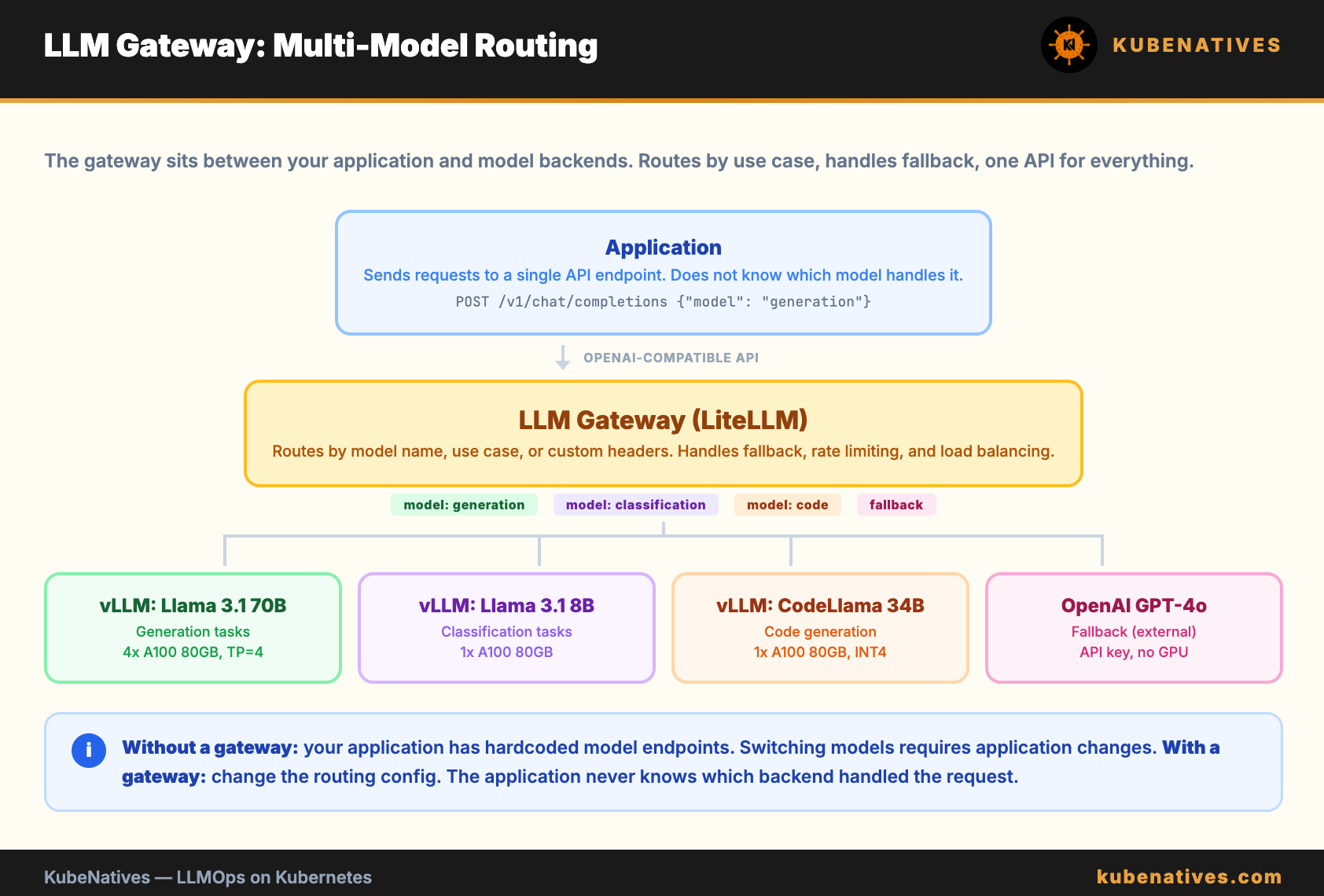
The gateway routes requests based on metadata in the request: model name, use case tag, user tier, or custom headers. If the primary model is overloaded or down, the gateway falls back to an alternative.
On Kubernetes, LiteLLM is the most common open source LLM gateway. It provides an OpenAI compatible API that proxies to multiple backends.
# LiteLLM config
model_list:
  - model_name: "generation"
    litellm_params:
      model: "hosted_vllm/meta-llama/Llama-3.1-70B-Instruct"
      api_base: "http://vllm-70b.inference:8000/v1"
  - model_name: "generation"
    litellm_params:
      model: "gpt-4o"
      api_key: "os.environ/OPENAI_API_KEY"
    # Fallback: if vLLM is down, route to OpenAI
Why this matters. Without a gateway, your application has hardcoded model endpoints. Switching models requires application changes. With a gateway, you change the routing config. The application never knows.
Pattern 4: Quality Observability
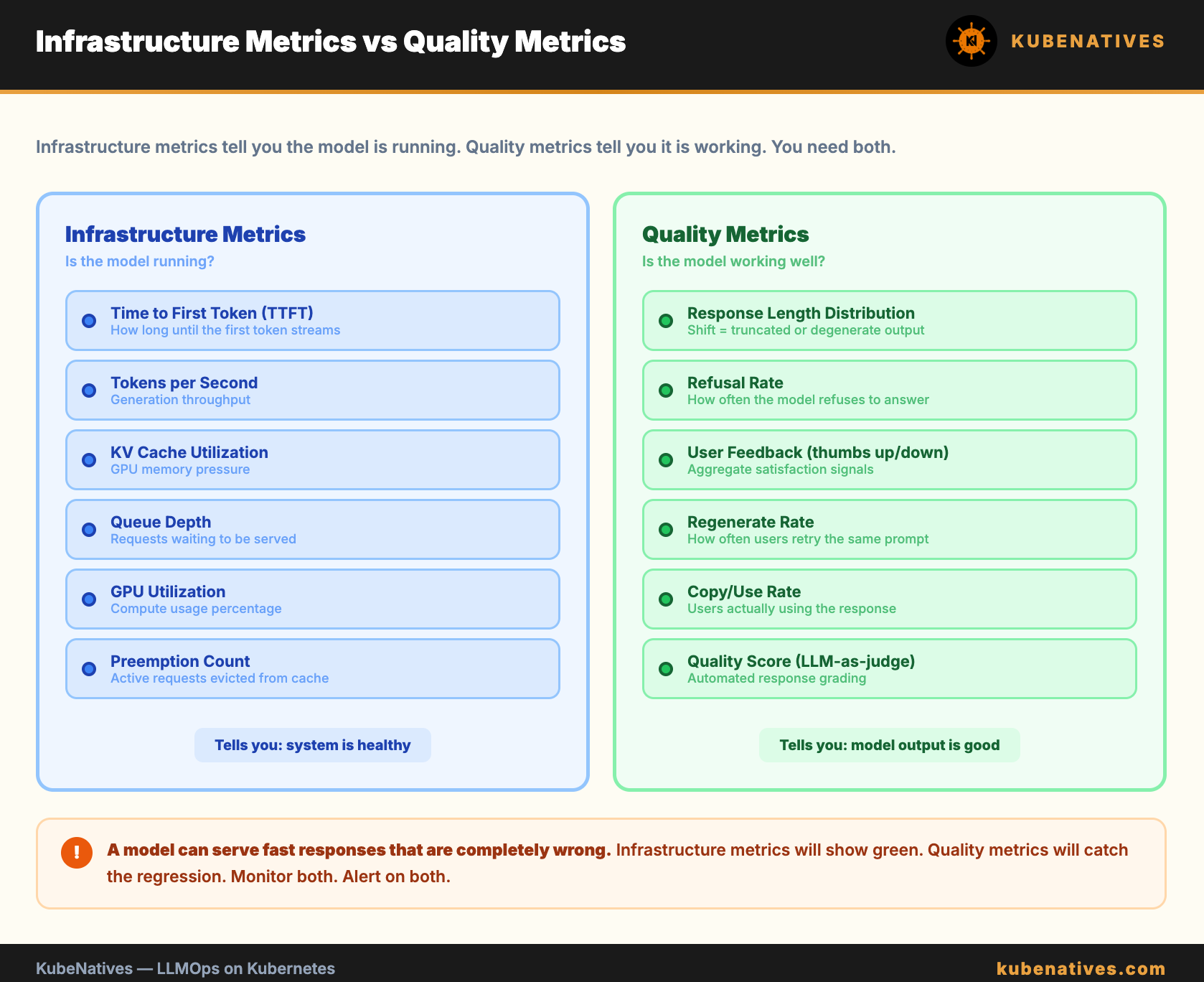
GPU metrics tell you if the model is running. They do not tell you if it is running well.
TTFT, throughput, and cache utilization are infrastructure metrics. They measure serving performance. But a model can serve fast responses that are completely wrong.
The pattern. Add a quality observability layer that tracks response characteristics over time.
Metrics to track:
Response length distribution. A sudden drop in average response length can indicate the model is generating truncated or degenerate responses. Plot a histogram of response token counts. Alert if the distribution shifts.
Refusal rate. How often the model refuses to answer (returns “I cannot help with that” or similar). A spike in refusals after a prompt change indicates the guardrails are too aggressive.
Latency per output token. Not just TTFT. Measure the time per token during decoding. If this increases without load changes, the model may be struggling with certain prompt patterns.
User feedback signals. Thumbs up/down, regenerate clicks, copy events. These are noisy individually but powerful in aggregate. A drop in positive signals after a model change is a quality regression.
# Custom metrics to export alongside vLLM metrics
- name: llm_response_tokens_total
  type: histogram
  help: Distribution of response lengths in tokens
  buckets: [10, 50, 100, 200, 500, 1000, 2000]

- name: llm_refusal_total
  type: counter
  help: Number of refusal responses detected

- name: llm_user_feedback
  type: counter
  labels: [feedback_type]
  help: User feedback signals (positive, negative, regenerate)
Why this matters. You cannot improve what you do not measure. Infrastructure metrics tell you the system is running. Quality metrics tell you it is working.
Pattern 5: Guardrails
Production LLMs need input and output filtering. Without guardrails, a user can prompt to inject the model to ignore its system instructions. Or the model can generate harmful, incorrect, or off-topic content.
The pattern. Two layers of filtering. Input guardrails before the model processes the request. Output guardrails after the model generates a response.
Request → Input Filter → Model → Output Filter → Response
Input filtering catches prompt injection attempts, PII in user messages, and requests that are outside the model’s intended scope.
Output filtering catches harmful content, PII in responses, and responses that contradict known facts (hallucination detection).
On Kubernetes, guardrails run as a sidecar container or a separate microservice in the request path. Running them as a sidecar keeps latency low (no network hop). Running them as a separate service allows independent scaling and updates.
The latency tradeoff. Every guardrail adds latency. Input filtering adds 10 to 50ms. Output filtering can add 50 to 200ms for content classification. For interactive chat applications, this matters. For batch processing, it does not.
The pattern for production: Run lightweight keyword and regex filters in the request path (low latency). Run heavier ML-based content classifiers asynchronously. Flag problematic responses for review rather than blocking them in real time.
Pattern 6: Cost Attribution
GPU infrastructure is expensive. When multiple teams share a model serving platform, you need to know who is using what and how much it costs.
The pattern. Tag every request with a team or project identifier. Aggregate GPU-seconds and token counts per tag. Charge back to teams based on usage.
On Kubernetes, this maps to namespace-level resource quotas for GPU allocation and request-level tagging for usage tracking.
Request headers:
  X-Team: search-team
  X-Project: product-search
  X-Budget-Code: eng-2024-q3
The LLM gateway logs these headers alongside token counts and GPU time. A billing pipeline aggregates usage per team per day.
search-team: 2.4M input tokens, 800K output tokens, 48 GPU-hours
recommendation-team: 1.1M input tokens, 400K output tokens, 22 GPU-hours
Why this matters. Without cost attribution, GPU spend is a shared cost that nobody owns. With attribution, teams optimize their own usage. The team generating 1M tokens per day will find ways to cache, batch, or use smaller models when they see their bill.
Putting It All Together
The 6 patterns form a stack:
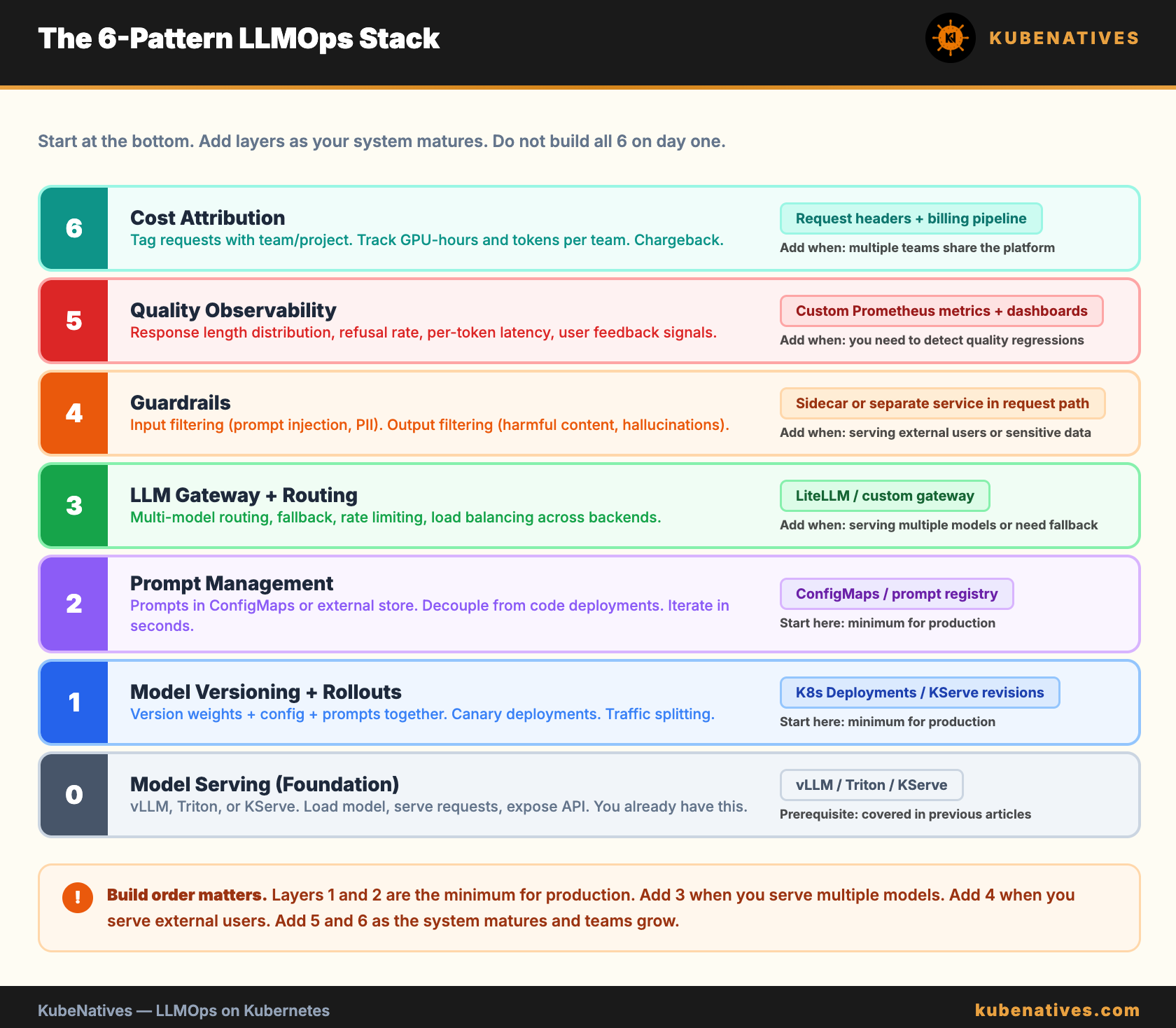
Model serving is the foundation. You already have this from the vLLM and Triton articles.
Start with model versioning and prompt management. These are the minimum for operating in production. Without them, every change is a risky manual process.
Add the LLM gateway when you serve multiple models or need fallback routing.
Add guardrails when you serve external users or handle sensitive data.
Add quality observability and cost attribution as the system matures and multiple teams start using it.
Do not build all 6 on day one. Start with the bottom of the stack and work up.
The Bottom Line
Deploying a model is the easy part. The hard part is versioning it, routing traffic to it, knowing if it is working well, keeping it safe, and understanding what it costs.
These 6 patterns are not theoretical. They are the operational layer that turns a vLLM deployment into a production LLM system. Every team running LLMs in production eventually builds all of them. The question is whether you build them intentionally or discover the need at 3 AM.
Start with model versioning and prompt management. Add the rest as your system grows.
Next week: vLLM Model Loading Strategies: PVCs, Init Containers, and Shared Storage.
If you are building LLM infrastructure on Kubernetes, I cover the intersection of GPU infrastructure, model serving, and production operations every week. Subscribe at kubenatives.com.