
Production Runbook: vLLM OOMKilled Recovery
When your inference pod dies mid-request with exit code 137. What to check, what to fix, and how to stop it from happening again.

Severity: High (production inference down) Audience: On call engineer Prerequisites: kubectl access, namespace admin, GPU node SSH if needed Time to resolve: 15 to 45 minutes
Symptom
Your vLLM pod restarted during normal traffic. Users saw 503 errors for the duration of the restart. The pod eventually came back but might OOM again on the next large request.
Signals you are in this runbook:
$ kubectl get pod vllm-0
NAME      READY   STATUS      RESTARTS   AGE
vllm-0    1/1     Running     3          2h

$ kubectl describe pod vllm-0 | grep -A3 "Last State"
    Last State:     Terminated
      Reason:       OOMKilled
      Exit Code:    137
Exit code 137 means the container received SIGKILL from the kernel OOM killer. Not from a crash. Not from vLLM code. The kernel decided the container used too much memory and killed it.
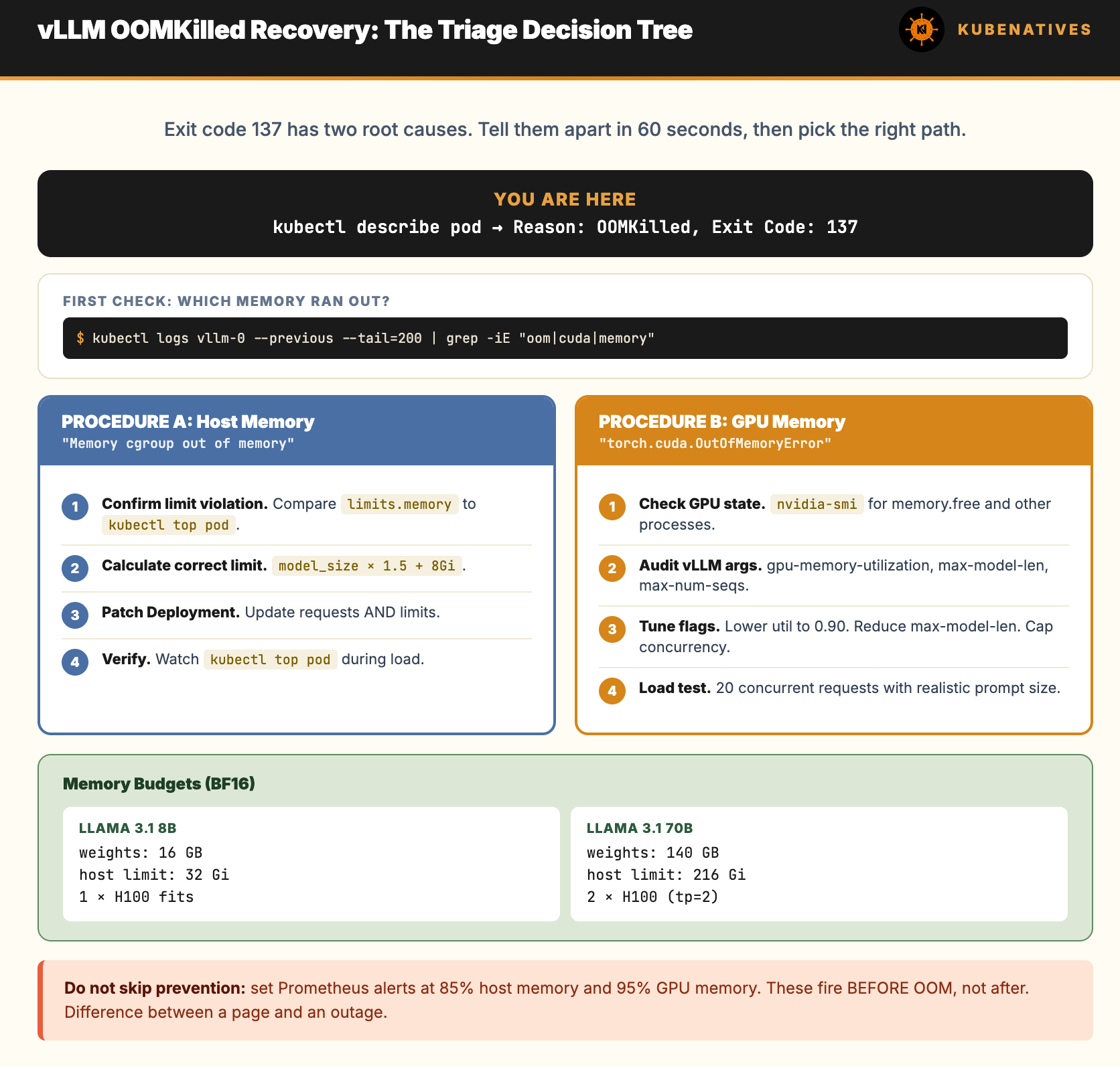
Quick Triage: Is This GPU Memory or Host Memory?
This is the first branch. vLLM has two memory failure modes and they need different fixes.
Check pod events:
kubectl describe pod vllm-0 | grep -A2 -i "oom\|killed"
If you see “Memory cgroup out of memory” in kubelet events: This is host memory OOM. The container exceeded its resources.limits.memory. Jump to Procedure A.
If you see “CUDA out of memory” or “torch.cuda.OutOfMemoryError” in vLLM logs: This is GPU memory OOM. The model tried to allocate more VRAM than available on the device. Jump to Procedure B.
If you see both or cannot tell: Pull the last 200 lines of logs from the previous container:
kubectl logs vllm-0 --previous --tail=200 | grep -iE "oom|memory|cuda|killed"
Look for the first memory related error. That is the trigger. Everything after is cascade.
Procedure A: Host Memory OOM (exit 137, kernel killed the container)
What happened: the container exceeded resources.limits.memory. Kubernetes killed it.
Root causes, ranked by frequency:
Memory limit set too low for the model size (most common)
Prefix caching or KV cache overflow into host memory via swap or CPU offload
Memory leak in vLLM (rare, usually requires version upgrade)
Step 1: Confirm the limit violation
# What was the memory limit?
kubectl get pod vllm-0 -o jsonpath='{.spec.containers[0].resources.limits.memory}'
# Example output: 32Gi

# What did it actually use before death?
kubectl top pod vllm-0 --containers 2>/dev/null || echo "metrics-server needed"
If limits are 32Gi and a 70B model needs host memory to mirror the weights during load, you will hit the limit on startup.
