
Architecture Template: vLLM Production Deployment on Kubernetes
Copy, configure, deploy. Every YAML file you need to run vLLM in production with monitoring, autoscaling, and model caching.

This template gives you a complete production-ready vLLM deployment on Kubernetes. Not a tutorial. Not a demo. A set of YAML files that you can copy into your cluster and configure for your model.
Every file includes comments explaining why each setting exists and how to adjust it for your workload.
What you get:
Namespace and RBAC
Hugging Face token Secret
Model cache PVC
vLLM Deployment with production settings
Service
HPA based on custom metrics
ServiceMonitor for Prometheus
PodDisruptionBudge
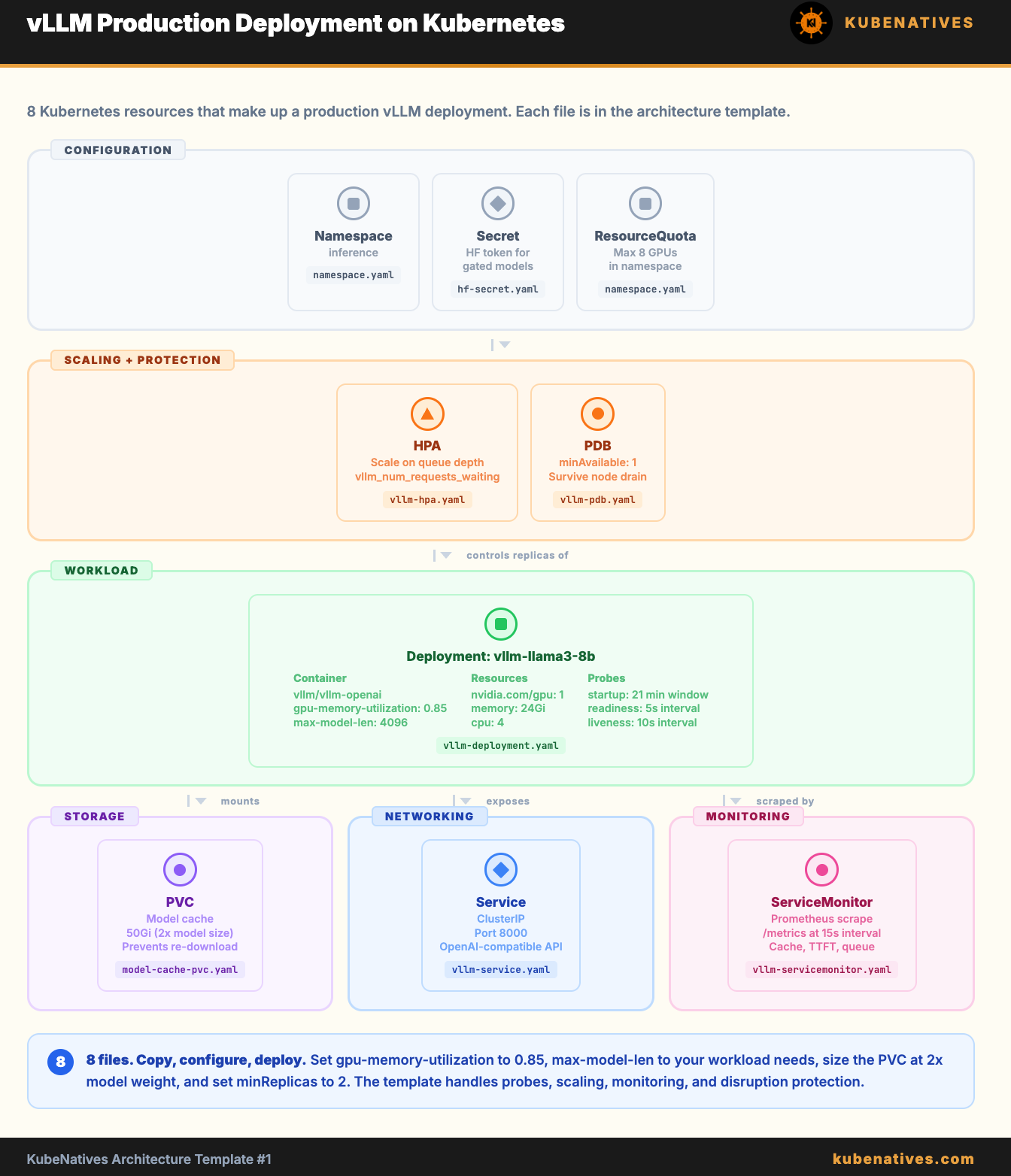
t
File 1: Namespace and RBAC
# namespace.yaml
# Separate namespace for inference workloads.
# Keeps GPU resource quotas and RBAC isolated from other workloads.
apiVersion: v1
kind: Namespace
metadata:
  name: inference
  labels:
    purpose: model-serving
---
# Optional: ResourceQuota to cap total GPU usage in this namespace
apiVersion: v1
kind: ResourceQuota
metadata:
  name: gpu-quota
  namespace: inference
spec:
  hard:
    requests.nvidia.com/gpu: "8"    # Max 8 GPUs in this namespace
    limits.nvidia.com/gpu: "8"
File 2: Hugging Face Token Secret
# hf-secret.yaml
# Your Hugging Face token for downloading gated models (Llama, Mistral, etc.)
# Generate at: https://huggingface.co/settings/tokens
#
# Create with:
#   kubectl create secret generic hf-token \
#     --from-literal=token=hf_YOUR_TOKEN_HERE \
#     -n inference
#
# Or apply this file after base64 encoding your token:
apiVersion: v1
kind: Secret
metadata:
  name: hf-token
  namespace: inference
type: Opaque
data:
  token: BASE64_ENCODED_TOKEN_HERE    # echo -n "hf_YOUR_TOKEN" | base64
