
vLLM vs Triton vs KServe: Choosing Your Model Serving Stack on Kubernetes
They solve different problems. Most teams pick the wrong one because they don’t realize that.

You’ve trained your model. It works in a notebook. Now you need to serve it on Kubernetes with actual SLAs, autoscaling, and GPU efficiency.
You search “model serving Kubernetes” and get three names: vLLM, Triton Inference Server, and KServe. Every comparison article gives you a feature table and says, “It depends.”
Not helpful when you’re making an architecture decision that you’ll live with for the next two years.
Here’s the core insight that most comparisons miss: these three tools operate at different layers of the stack.
Comparing them side by side is like comparing nginx, Flask, and Kubernetes itself. They can overlap, but they’re fundamentally designed to solve different problems.
Let me explain what each one actually does, where it sits in the architecture, and how to pick the right combination for your workload.
The Three Layers of Model Serving
Before comparing the tools, you need to understand the three layers involved in serving models on Kubernetes:
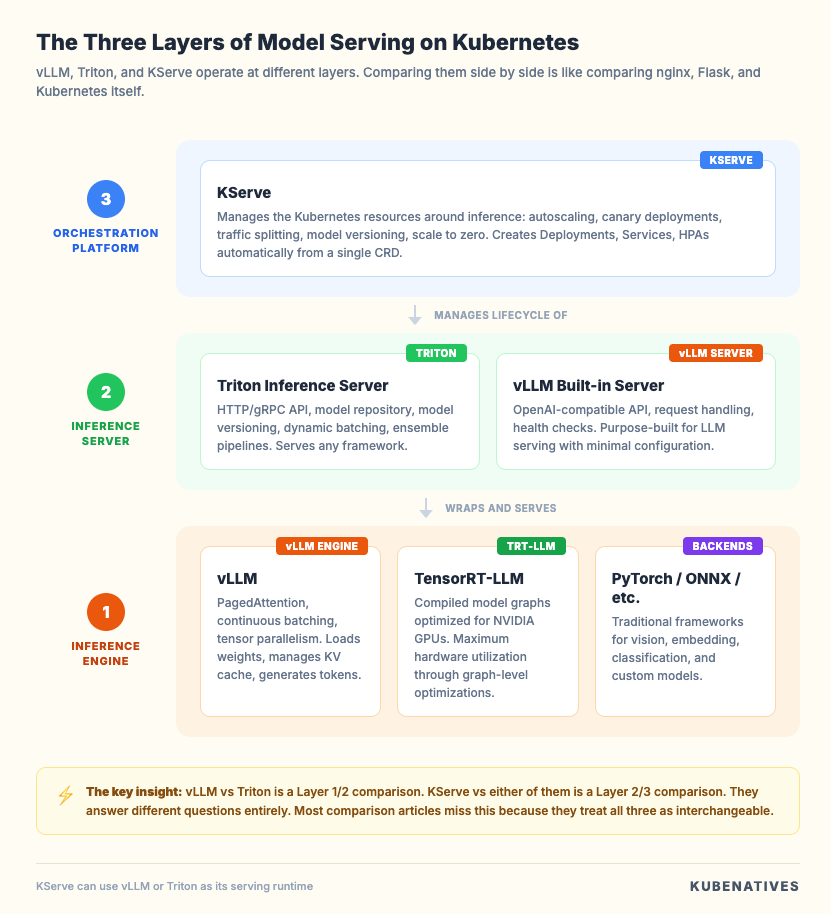
Layer 1: The Inference Engine. This is the component that actually runs your model. It loads weights into GPU memory, processes input tensors, and generates outputs.
vLLM and Triton’s TensorRT-LLM backend are inference engines. They care about token throughput, memory management, and GPU utilization.
Layer 2: The Inference Server. This wraps the engine in an HTTP/gRPC API, handles request batching, manages model loading and unloading, and exposes health checks.
Triton Inference Server operates at this layer. vLLM also has its own built-in server with an OpenAI-compatible API.
Layer 3: The Orchestration Platform. This manages the Kubernetes resources around your inference workloads: autoscaling, canary deployments, traffic splitting, model versioning, and rollback.
KServe operates at this layer. It doesn’t serve models itself. It orchestrates the things that do.
The confusion in every comparison article comes from mixing these layers. vLLM vs Triton is a Layer 1/2 comparison.
KServe vs either of them is a Layer 2/3 comparison. They’re answering different questions entirely.
vLLM: The LLM Specialist
vLLM is a purpose-built inference engine for large language models. Developed at UC Berkeley, it introduced PagedAttention, a memory management technique that treats GPU memory as virtual memory pages rather than allocating fixed, contiguous blocks per request.
What it does well:
PagedAttention eliminates the memory fragmentation that kills GPU utilization in LLM serving.
Traditional inference servers pre-allocate memory for the maximum sequence length per request. A request that uses 2K tokens still reserves 32K tokens of memory.
vLLM allocates memory in small pages and grows dynamically, which means you can serve 3 to 5x more concurrent requests on the same GPU.
Continuous batching is the other major advantage. Traditional batching waits for a batch to fill before processing.
vLLM processes requests at the iteration level, inserting new requests into the batch as soon as a slot opens. This keeps GPU utilization above 90% even with variable request lengths.
The built-in server exposes an OpenAI-compatible API out of the box. If your application already uses the OpenAI API, you can point it at vLLM with no code changes.
It supports tensor parallelism to split large models across multiple GPUs, speculative decoding to reduce latency, and a wide range of quantization formats, including GPTQ, AWQ, and FP8.
What it doesn’t do:
vLLM is LLM only. It doesn’t support computer vision models, speech recognition models, or traditional ML models such as XGBoost or scikit-learn.
It doesn’t have a model repository, model versioning, or ensemble pipelines. It doesn’t support traffic splitting, canary deployments, or Kubernetes-native autoscaling.
It’s a fast, focused engine that does one thing extremely well: serve LLM inference requests with maximum GPU efficiency.
When to use it: You’re serving one or a few large language models. Your primary concern is token throughput and per-request latency.
You want the fastest path from “model in a registry” to “production inference endpoint.”
Triton Inference Server: The Multi-Framework Platform
Triton is NVIDIA’s general-purpose inference server. It’s designed to serve any model framework (PyTorch, TensorFlow, ONNX, TensorRT, XGBoost, and custom Python backends) through a unified API.
What it does well:
Model diversity is Triton’s superpower. If your organization runs a mix of workloads, including LLMs for chat, a BERT model for embeddings, a ResNet for image classification, and an XGBoost model for fraud detection, Triton serves all of them through the same infrastructure. Same API, same monitoring, same deployment patterns.
The model repository is a feature that matters more than people realize in production. Triton watches a directory (local, S3, or GCS) and automatically loads, unloads, and version manages models.
You deploy a new model version by dropping it in a folder. Triton handles the rest, including graceful transitions from v1 to v2.
Model ensembles let you chain multiple models in a pipeline.
For example: tokenizer → embedding model → reranker.
Each step runs as a separate model in Triton, and the server handles the data passing between them.
This is particularly useful for RAG pipelines where you need embeddings and generation in the same request flow.
Dynamic batching works well for models with fixed output lengths (classification, embeddings). For LLMs specifically, Triton uses the TensorRT-LLM backend or can integrate vLLM as a backend, which gives you PagedAttention and continuous batching through Triton’s enterprise API.
What it doesn’t do:
Triton is more complex to set up than vLLM. The model repository structure, config files, and backend selection add configuration overhead.
For pure LLM workloads, the setup complexity doesn’t justify itself unless you need Triton’s multi-model capabilities.
TensorRT-LLM (Triton’s optimized LLM backend) delivers excellent raw performance but requires model compilation to TensorRT format, which adds a build step and limits flexibility when you need to swap models quickly.
It also doesn’t handle Kubernetes orchestration. Triton is a server, not a platform. You still need to manage Deployments, Services, HPAs, and rollout strategies yourself.
When to use it: You’re serving multiple model types across frameworks. You need a unified inference API for your platform team. You’re already invested in the NVIDIA ecosystem and want maximum hardware optimization.
KServe: The Kubernetes Orchestration Layer
KServe is fundamentally different from vLLM and Triton. It’s a Kubernetes Custom Resource Definition (CRD) that manages the lifecycle of inference workloads.
As of late 2025, it’s a CNCF incubating project, which signals long-term community support and ecosystem integration.
What it does well:
KServe treats model serving as a Kubernetes native problem. You define an InferenceService, and KServe creates the Deployment, Service, HPA, and optionally the Knative serving resources. A simple deployment looks like this:
apiVersion: serving.kserve.io/v1beta1
kind: InferenceService
metadata:
  name: llama-service
spec:
  predictor:
    model:
      modelFormat:
        name: huggingface
      resources:
        limits:
          nvidia.com/gpu: "1"
      storageUri: "hf://meta-llama/Llama-3.1-8B-Instruct"
That single resource handles everything: pulling the model, starting the serving runtime, configuring the GPU resources, setting up the endpoint, and enabling autoscaling.
Traffic management is where KServe shines for production workflows. You can run canary deployments with percentage-based traffic splitting between model versions.
You can A/B test model versions by routing a percentage of traffic to a new revision while monitoring performance before cutting over.
Autoscaling is built in through both Knative (scaling to zero based on request count) and KEDA integration (scaling based on custom metrics such as vLLM’s pending request queue or GPU utilization from DCGM).
For LLM workloads with bursty traffic patterns, this matters because you’re not paying for idle GPUs during low traffic periods.
The runtime pluggability is a critical design choice. KServe doesn’t serve models itself. It supports multiple serving runtimes, including vLLM, Triton, Hugging Face TGI, and custom runtimes.
This means you can use vLLM as the engine for LLM workloads and Triton for everything else, all managed through the same KServe InferenceService API.
What it doesn’t do:
KServe adds infrastructure complexity. It requires Knative or a Kubernetes Gateway API implementation, Istio or another service mesh (optional but recommended), and cert-manager. The installation footprint is significant compared to deploying vLLM directly.
It also adds latency. The routing layer (Istio/Knative) adds 1-3ms per request. For latency-sensitive applications where every millisecond matters, this overhead needs to be measured against the operational benefits.
For small teams serving a single model, KServe is overkill. The operational overhead of maintaining the KServe stack doesn’t justify itself until you have multiple models, multiple teams, or deployment patterns that require traffic management.
When to use it: You’re running multiple models across teams. You need canary deployments, traffic splitting, or the ability to scale to zero. You want a platform abstraction that decouples model developers from Kubernetes operations.
The Decision Framework
Here’s how I think about this decision for production workloads:
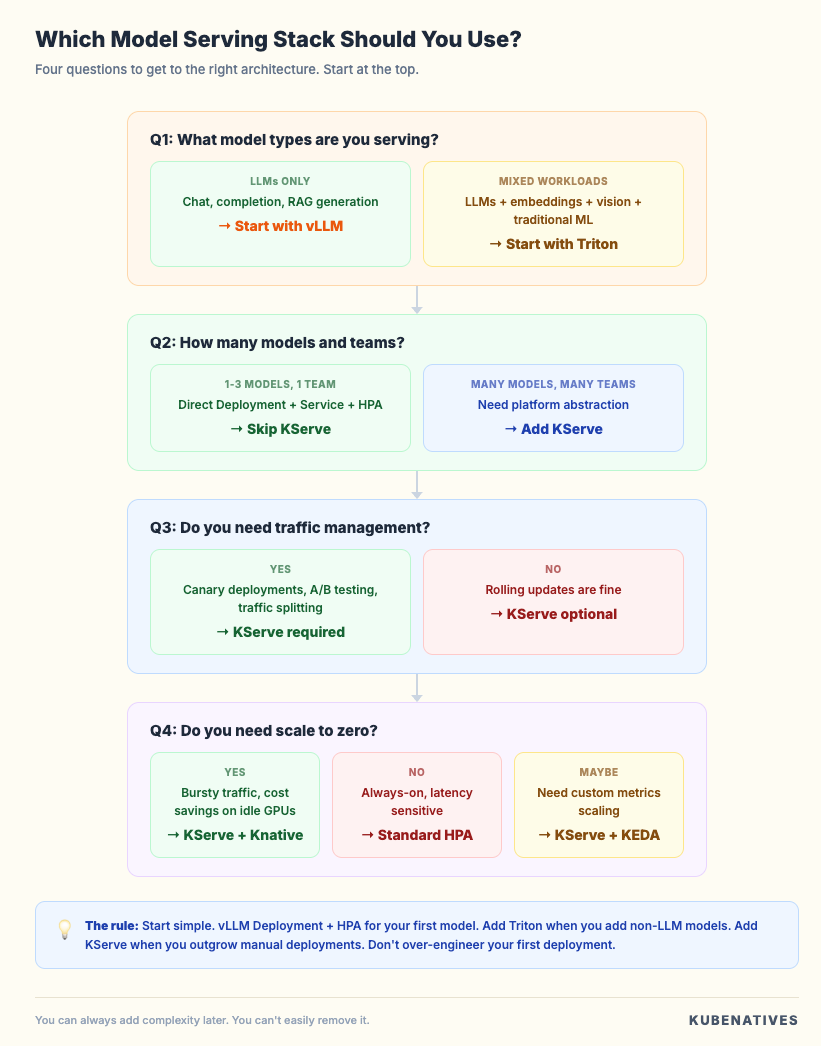
Start with your workload type.
If you’re only serving LLMs (chat, completion, RAG generation), start with vLLM. It gives you the best performance per GPU dollar with the least configuration overhead. Deploy it as a Kubernetes Deployment with an HPA, and you’re running in production.
If you’re serving a mix of model types (LLMs, embeddings, vision, and traditional ML), Triton is the right foundation.
The model repository and unified API eliminate the operational burden of maintaining separate infrastructure for each model type.
Then decide if you need orchestration.
If you’re deploying one or two models and your team manages Kubernetes directly, skip KServe.
Write your Deployments, Services, and HPAs by hand. The added abstraction isn’t worth the infrastructure cost.
If you’re running a model serving platform for multiple teams, need canary deployments between model versions, or want to scale to zero to manage GPU costs, add KServe on top. Use vLLM or Triton as the serving runtime underneath.
The combination that works for most teams:
For LLM-focused teams: vLLM as the engine, deployed directly as a Kubernetes Deployment. Add KServe when you outgrow manual deployments.
For platform teams serving diverse models: Triton as the inference server for everything, with KServe as the orchestration layer for lifecycle management.
For the hybrid case (LLMs plus other models): vLLM for LLM workloads, Triton for everything else, KServe orchestrating both through the same InferenceService API.
The Kubernetes Resource Comparison
Here’s what each tool actually creates when you deploy it:
vLLM standalone:
# You create and manage:
- Deployment (vLLM container + model config)
- Service (ClusterIP or LoadBalancer)
- HPA (custom metrics or resource based)
- PVC (for model storage, optional)
- ConfigMap (for vLLM args)
Triton standalone:
# You create and manage:
- Deployment (Triton container + model repo mount)
- Service (gRPC + HTTP ports)
- HPA (custom metrics)
- PVC or S3 config (model repository)
- ConfigMap (per model config.pbtxt files)
KServe with vLLM runtime:
# You create:
- InferenceService (single resource)

# KServe creates and manages:
- Deployment
- Service
- HPA or Knative autoscaler
- Virtual Service (traffic routing)
- Revision tracking
The tradeoff is clear. Direct deployment gives you full control but more YAML to manage. KServe gives you less YAML but adds infrastructure dependencies.
Performance Characteristics
These numbers aren’t benchmarks. They’re directional characteristics to understand the performance profile of each tool.
vLLM optimizes for token throughput. PagedAttention and continuous batching typically achieve 3 to 5x higher throughput than naive PyTorch serving for LLM workloads.
Latency is optimized at the engine level with speculative decoding and chunked prefill.
Triton with TensorRT-LLM can match or exceed vLLM’s raw throughput by optimizing the model graph for specific GPU architectures.
The tradeoff is compilation time and reduced flexibility. With the vLLM backend, Triton inherits vLLM’s performance characteristics plus a small overhead from the Triton serving layer.
KServe adds routing overhead (1-3ms through the ingress/service mesh layer). This is negligible for most LLM workloads, where generation takes hundreds of milliseconds to seconds.
The autoscaling behavior (especially scale-to-zero with Knative) can add a cold-start latency of 30 seconds or more as GPU pods initialize and load models.
For latency-sensitive applications, measure the full stack. Inference engine performance matters most, but routing, autoscaling cold starts, and model loading time all contribute to the end-user experience.
The Hybrid Architecture
The architecture I recommend for most production ML platforms looks like this:
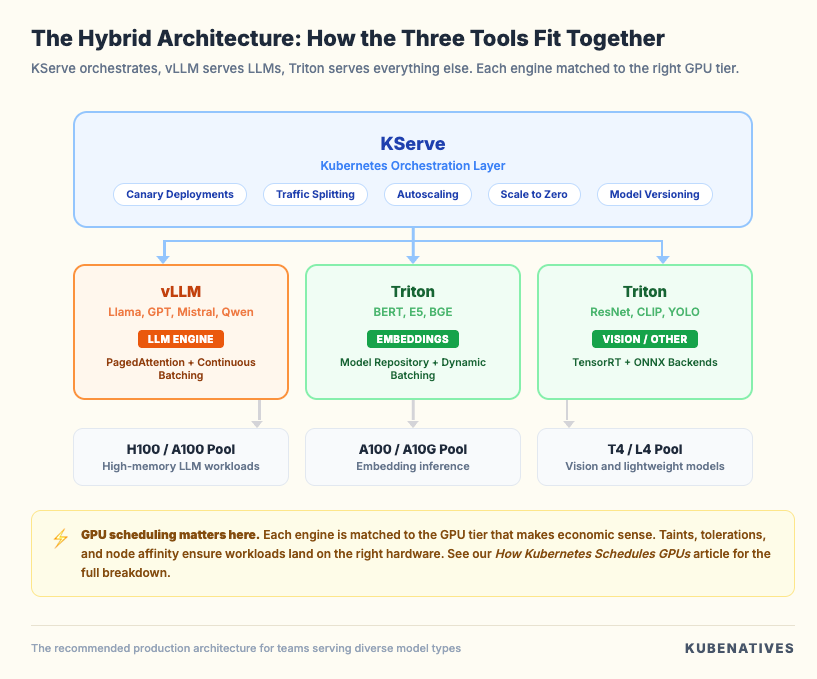
vLLM handles the LLM workloads where PagedAttention and continuous batching matter most. Triton handles everything else through its multi-framework model repository.
KServe sits on top, providing a unified InferenceService API, traffic management, and autoscaling for all of them.
Each engine is matched to the GPU tier that makes economic sense. LLMs get the H100s. Embedding models get A100s. Vision models get T4s.
The GPU scheduling and node pool configuration (taints, tolerations, node affinity) ensure workloads land on the right hardware.
This connects directly to our GPU scheduling article, where we covered how device plugins, MIG, and time-slicing control which workloads get which GPUs.
Common Mistakes
Mistake 1: Starting with KServe for a single model. If you’re serving one LLM, a Deployment plus Service plus HPA is 40 lines of YAML.
KServe adds Knative, Istio, cert-manager, and the KServe controller. That’s a lot of infrastructure for one model.
Mistake 2: Using Triton for LLM-only workloads. Triton’s strengths are multi-framework support and the model repository.
If you’re only serving LLMs, vLLM gives you better performance with less configuration. Don’t add complexity you don’t need.
Mistake 3: Ignoring the runtime layer in KServe. KServe is only as good as the runtime underneath. Deploying KServe with a default Hugging Face runtime when you should be using vLLM means you’re getting KServe’s orchestration benefits while leaving 3 to 5x throughput on the table.
Mistake 4: Treating Triton and vLLM as competitors. They’re increasingly complementary. Triton can use vLLM as a backend, providing PagedAttention via Triton’s enterprise API.
The official Triton vLLM backend is actively maintained and production-ready.
Mistake 5: Not measuring cold start latency. Scaling KServe to zero sounds great for GPU cost savings.
But if your model takes 45 seconds to load onto a GPU, the first request after scale-up gets a 45-second latency spike. Measure this before enabling scale to zero in production.
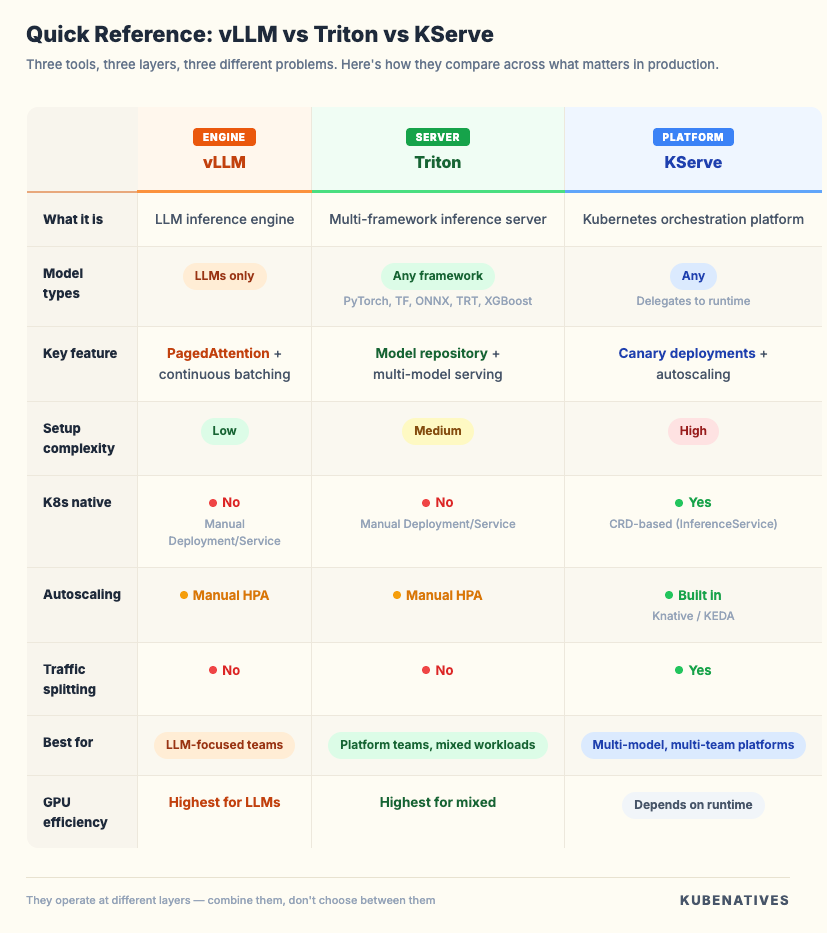
Quick Reference
The Bottom Line
Don’t pick one. Understand what layer each tool operates at, and combine them based on your workload.
If you’re serving LLMs on Kubernetes, start with vLLM. Get it running, measure your throughput, and understand your GPU utilization.
Add Triton when you need to serve non-LLM models alongside your LLMs. Add KServe when you need platform-level orchestration for multiple models and teams.
The worst decision is over-engineering your first deployment. Start simple. Add complexity when the problem demands it, not before.
Next week: etcd Debugging Guide: When Your Cluster Starts Losing Its Memory.
If you’re building inference infrastructure on Kubernetes, I cover GPU scheduling, model serving, and production operations every week. Subscribe at kubenatives.com.