
What the API Server Actually Does
And Why Your Cluster Breaks Without It

You know that moment when you run kubectl get pods and it just... works? Or when you create a Deployment and suddenly pods start appearing across your nodes?
That’s the API server doing its thing. But here’s what most people don’t realize: the API server doesn’t actually create those pods. It doesn’t schedule them. It doesn’t manage your ReplicaSets. Hell, it doesn’t even tell other components what to do.
So what does it actually do? Let’s pull back the curtain.
The API Server is a Bouncer, Not a Manager
Think of the API server as the world’s most paranoid database frontend. Every single interaction with your cluster goes through it - kubectl commands, controllers, schedulers, kubelet, everything. Its job is to:
Authenticate you
Authorize your request
Validate your resource definition
Store it in etcd
Tell everyone who cares that something changed
That’s it. No orchestration logic. No scheduling decisions. Just gate-keeping and gossip.
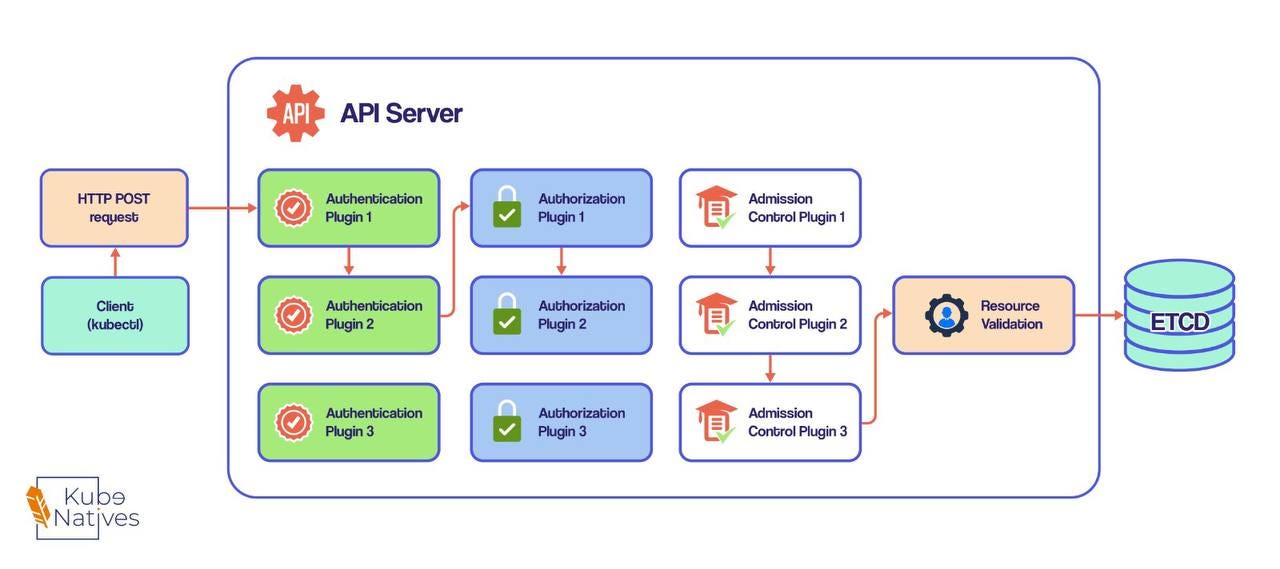
The Three-Stage Security Gauntlet
When you fire off a kubectl apply -f deployment.yaml, that request runs through three distinct plugin systems before anything gets stored:
Stage 1: Authentication - Who Are You?
The API server calls authentication plugins in sequence until one recognizes you. It’s extracting:
Your username
Your user ID
The groups you belong to
This could come from your client certificate, a bearer token in the Authorization header, or whatever auth method your cluster uses.
In production, you’re probably seeing webhook token auth, OIDC, or client certificates.
Production Reality Check: This is why your ServiceAccount tokens matter. When a pod needs to talk to the API server, it’s using that token to get through this stage. No valid auth? Request dies here.
Stage 2: Authorization - Can You Do This?
Now the API server knows WHO you are. But can you actually create pods in that namespace? Can you delete that ConfigMap?
Authorization plugins check this. Each plugin gets a turn to approve or deny. As soon as one says “yes,” you’re through to the next stage.
This is your RBAC layer in action. Those ClusterRoles and RoleBindings you’ve been writing? They’re powering authorization plugins.
The Gotcha: When debugging permissions, remember that authorization happens AFTER authentication. “Forbidden” errors mean you authenticated fine but lack permissions. “Unauthorized” means you didn’t even get past authentication.
Stage 3: Admission Control - Should This Be Allowed?
Here’s where it gets interesting. Even if you’re authenticated and authorized, Admission Control plugins can still:
Modify your resource (adding default values, injecting sidecars)
Block your request entirely
Modify OTHER resources you didn’t even mention
Examples you’re probably running in production:
AlwaysPullImages: Overrides your imagePullPolicy to Always. Great for security, terrible for your image registry bill.
ServiceAccount: Auto-assigns the default ServiceAccount to pods that don’t specify one. This is why pods can suddenly talk to the API server even when you didn’t set up auth.
NamespaceLifecycle: Blocks pod creation in namespaces being deleted. Ever wondered why you can’t create resources in a namespace stuck in “Terminating”? This plugin.
ResourceQuota: Enforces namespace resource limits. Your pod creation fails with “exceeded quota” errors? This is why.
Important: Admission Control only runs for CREATE, UPDATE, and DELETE operations. Read operations (GET, LIST) skip this entirely. This is why you can list pods in a namespace even if a ResourceQuota would block you from creating new ones.
After the Gauntlet: Validation and Storage
Once your request survives all three stages, the API server:
Validates the object schema (is this even valid YAML/JSON for a Pod?)
Writes it to etcd
Returns a response to you
That’s when you see pod/nginx created in your terminal.
The Watch Mechanism: How Controllers Actually Work
Here’s the mind-bending part: the API server doesn’t tell controllers what to do. Controllers WATCH for changes.
Every controller opens an HTTP connection to the API server and says “tell me whenever X changes.” When you create a Deployment:
API server stores it in etcd
API server notifies all watchers: “New Deployment object exists”
Deployment controller sees this, creates a ReplicaSet
API server stores the ReplicaSet in etcd
API server notifies watchers: “New ReplicaSet object exists”
ReplicaSet controller sees this, creates Pods
... and so on
This is why Kubernetes feels “eventually consistent.” Changes propagate through the system via watch events, not direct commands.
Try this in your cluster:
kubectl get pods --watch
You’re now doing exactly what controllers do. You’ll see a stream of events as pods change state. This is the same mechanism the Scheduler uses to find new pods that need scheduling.
Want to see the full object on each change?
kubectl get pods -o yaml --watch
Welcome to the controller’s world view.
Production Insight: Why etcd Clusters Are Always Odd Numbers
Quick side note that’ll save you from a bad architecture decision:
Running 2 etcd instances is WORSE than running 1.
Why? Quorum math. With 2 instances, you need both running to have a majority.
If one fails, no majority = no writes.
You’ve just doubled your failure modes without gaining any fault tolerance.
With 3 instances, you can lose 1 and still have majority (2/3).
With 4 instances, you STILL need 3 for majority, so you can still only lose 1.
Same fault tolerance, higher chance of a second failure.
The pattern:
3 instances: tolerates 1 failure
5 instances: tolerates 2 failures
7 instances: tolerates 3 failures
For most production clusters, 5 or 7 etcd instances is plenty. Any more and you’re just burning money on raft consensus overhead.
What This Means for You
Understanding the API server’s actual job helps you debug production issues:
“Pods aren’t starting” → Is the API server even storing the pod spec? Check if admission webhooks are timing out.
“Permission denied” → Which stage? Authentication (who) or Authorization (can)?
“My webhook isn’t being called” → Only called during admission control, only for write operations.
“etcd is falling behind” → API server writes are probably fine, but watch notifications might be delayed. Check controller lag.
“Cluster feels slow” → API server might be the bottleneck. Every operation flows through it.
The API server is the only component that writes to etcd.
It’s the only component that enforces RBAC.
It’s the single source of truth for cluster state. Everything else is just watching and reacting.
When you internalize that, Kubernetes starts making a lot more sense.
Next week: We’re diving into the Scheduler’s decision-making process. Ever wondered how it actually picks which node gets your pod?
Until then, may your admission webhooks always respond in under 30 seconds.
P.S. If you’re dealing with multi-tenant clusters, understanding admission control is critical for security.
Those MutatingWebhooks and ValidatingWebhooks? They’re admission control plugins. More on that in a future deep-dive.